What Is an Agent Harness? Components, Examples, and Harness Engineering
Written By:
RapidFire AI
Published on
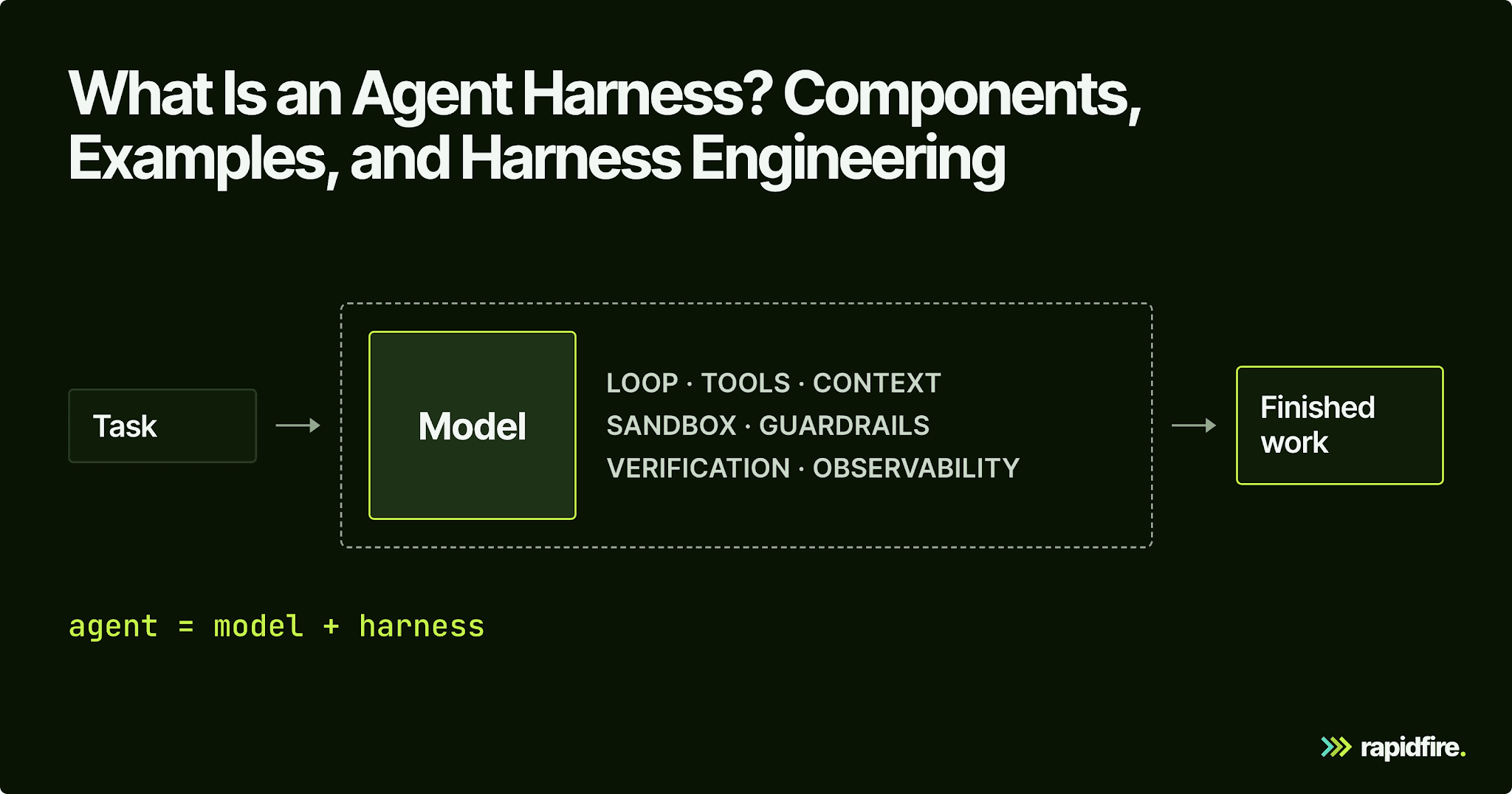
Put the same model inside two different AI agents, and you can get two very different products. One reads the failing test, fixes the code, reruns the suite, and stops when it passes. The other edits the same file ten times and runs out of turns. The model didn't change, but the agent harness did: the code around the model that runs the loop, executes tools, manages context, and decides when the work is finished.
This guide covers harness components, examples, and how to compare harness choices on a shared eval set.
What Is an Agent Harness?
An agent harness is the software around a language model that turns it into a working agent. It runs the loop that calls the model, executes the model's tool calls, feeds each result back, manages context and memory, enforces limits and permissions, and checks the work. LangChain's shorthand for it is Agent = Model + Harness.
You'll also see the terms AI harness and agent scaffolding for this runtime layer. If the model is the engine, the harness is the rest of the car.
A raw model asked to fix a failing test can only describe a fix. Every step after that, from running the suite in a sandbox to editing the code and stopping at a turn limit, is the harness's job.
Agent vs. Model vs. Harness (and How a Harness Differs From a Framework)
These terms get used loosely, so here's how they line up:
Term | What it is | Example |
|---|---|---|
Model | The language model that reads the context and decides the next step | gpt-5.2-codex, Claude Opus 4.6 |
Harness | Everything that runs the model as an agent: loop, tools, context, permissions, checks | Claude Code, Codex CLI, deepagents-cli |
Agent | Model plus harness, working on a task | A coding agent fixing a failing test |
Agent framework | Libraries you assemble an agent from | LangChain, LangGraph |
Runtime | The layer that executes the agent and keeps its state | The LangGraph runtime, which Deep Agents uses for durable execution |
Orchestration layer | Logic that routes work between agents, subagents, or models | Deep Agents' task tool, which spawns subagents |
Depending on who you ask, different sources will draw the framework boundary differently. LangChain includes everything around the model in the harness. Arize reserves the term for an assembled runtime that agents can operate through, distinguishing it from libraries such as LangChain and LangGraph that developers use to build agents.
An agent framework gives you parts. A harness is an assembled, opinionated runtime that works on a task out of the box.
Deep Agents shows the overlap well: it combines an agent harness with LangChain's building blocks and the LangGraph runtime. For more on how those pieces relate, see our guide to LangGraph vs. LangChain.
Core Components of an Agent Harness
A harness design needs decisions in six areas:

The Control Loop
The harness sends the system prompt, the task, and the conversation history to the model, gets back a final answer or tool calls, runs the calls, feeds the result back, and repeats. This reason-act-observe cycle is often called the ReAct loop, after the ReAct paper by Yao et al., in which models interleave reasoning traces with task-specific actions.
The sketch below shows the control flow: ask the model for its next step, check any tool calls, return their results, and repeat until the model answers or reaches the turn limit.
This is Python-shaped pseudocode, not a runnable SDK example. The model.generate adapter must return content and tool_calls. The helper functions represent code you would supply; in particular, run_sandboxed needs a separately configured isolated executor. Calling a helper with that name does not create a sandbox.
An iteration limit bounds how many model/tool rounds a request can consume. Microsoft's harness exposes a configurable per-request limit, corresponding to max_turns in the sketch.
Tools and Code Execution
Tools are how the model acts: search the web, read a file, query a database, and run code. The harness decides which tools exist, how each is described, and how results get trimmed before they go back into context. The Model Context Protocol (MCP) is an open protocol for connecting LLM applications to external tools and data, and coding agents like Claude Code use it to reach systems such as Jira or Google Drive.
Having more tools isn't automatically better. Every tool description costs context, and overlapping tools give the model more ways to pick the wrong one. Vercel's text-to-SQL agent, covered below, got faster and passed more of its test queries after most of its specialized tools gave way to a general bash tool.
Context and Memory Management
A long conversation can become hard for the model to use even before it fills the context window. This decline in recall and reasoning is often called context rot. The harness therefore needs a policy for deciding what the next model call should see.
Common approaches include summarizing older turns, storing large tool outputs in files, and loading instructions or skills only when needed. Compaction must preserve the details needed to continue the task. Microsoft's harness, for example, can compact history when you supply token limits.
Memory helps the agent resume work across sessions. It stores important state outside the current context window, so a fresh session can recover what happened and what remains.
Anthropic's harness for long-running coding agents uses an initializer to prepare the environment. Later sessions read the git log, a claude-progress.txt file, and a feature list, then use init.sh to start the development server. Those records give the next session a concrete starting point instead of making it reconstruct the previous session's work.
Sandboxes and Permissions
Tool calls can execute code or alter external state, so define where they run and what they can access. Run tool code in an isolated executor, such as a configured container or remote sandbox, with scoped file access, allowed commands, network restrictions, and credentials kept outside the agent's direct control. The MCP specification treats tool execution as a security boundary requiring caution.
Guardrails, Approvals, and Human-in-the-Loop
Guardrails are rules the harness enforces no matter what the model says:
Approval gates for risky actions. MCP hosts must obtain explicit user consent before invoking any tool, and Microsoft's harness enables standing approvals and auto-approval rules by default.
Limits on turns, time, and spend, so a stuck agent stops instead of burning tokens.
Loop detection. LangChain's harness counts edits per file and nudges the agent to rethink after repeated edits, because some traces showed "doom loops" of 10 or more small variations on one broken approach.
Verification, Evaluation, and Observability
Self-verification means the agent has to check its own work before it's allowed to finish: run the tests, re-read the spec, and compare the output against the task. LangChain added a hook that intercepts its agent right before exit and makes it run a verification pass against the task spec. Claude Code exposes the same idea as hooks that run shell commands before or after the agent's actions.
Observability is the trace of every model call, tool call, and result; Microsoft's harness turns on OpenTelemetry tracing by default. Evaluation sits one level up, scoring whole runs against a set of tasks so you know whether a harness change helped or just moved the failures.
Agent Harness Examples
AI agent harnesses come in a few shapes: coding agents you run directly, harnesses you build on, and platform harnesses inside a larger SDK. These are descriptions, not rankings:
Harness | Kind | What stands out |
|---|---|---|
Claude Code (Anthropic) | Coding agent | Reads your codebase, edits files, runs commands; available in the terminal, IDE, desktop app, and browser |
Codex CLI (OpenAI) | Coding agent | Runs locally on your computer; Apache-2.0 licensed |
Coding agent | Open source (MIT); terminal, desktop, or IDE; works with any LLM provider | |
Minimal harness | Calls itself "a minimal, extensible agent harness"; skips sub-agents and plan mode by default (MIT) | |
Deep Agents (LangChain) | General-purpose harness | Virtual file system, subagents via a task tool, built on the LangGraph runtime |
Microsoft Agent Framework harness | Platform harness | create_harness_agent with todo tracking, file memory, tool approval, and tracing built in |
An SDK can supply the harness too: the Claude Agent SDK manages context and lets a model gather information, plan, and act through tools. Some tools even treat the harness as swappable. OpenClaw, the popular open-source assistant, supports model and harness plugins (including Claude, Codex, and local models), so you can swap choices without replacing the rest of the system.
What Is Harness Engineering?
Harness engineering is the practice of designing, testing, and improving everything around the model (prompts, tools, context, control flow, guardrails, and verification) so an AI agent behaves reliably on a specific task. Where prompt engineering tunes the words, harness engineering for AI agents tunes the whole system the model runs inside.
The term spread in early 2026. Mitchell Hashimoto used harness engineering to describe turning observed agent mistakes into better instructions and tools that prevent recurrence. Six days later, OpenAI described an internal beta product built with agent-generated code and no manually written lines, with humans directing the work and agents implementing it.
Here's how it relates to the two disciplines it grew out of:
Discipline | What you change | Scope | Example |
|---|---|---|---|
Prompt engineering | The instructions | One model call | Rewording a system prompt so the agent states its plan first |
Context engineering | Which tokens the model sees at each step | One step's context window | Picking chunk size, retrieval depth, or which tool outputs to summarize |
Harness engineering | The loop, tools, context policy, permissions, and checks | The full agent run, across steps and sessions | Adding a pre-exit verification hook, or swapping a pile of narrow tools for a shell |
Each layer contains the one above it, so you can't build a good harness while ignoring context engineering or prompt optimization.
The same framing runs through our homepage, which leads with harness engineering to escape AI pilot purgatory.
Why the Harness Matters as Much as the Model
The following comparisons hold the model fixed while changing the tools, settings, or context it receives:
Who | Same model | What changed | Result |
|---|---|---|---|
LangChain, deepagents-cli | gpt-5.2-codex | System prompt, tools, middleware hooks, and how reasoning effort is split across the run | 52.8 to 66.5 on Terminal Bench 2.0 (Top 30 to Top 5) |
Vercel, d0 text-to-SQL agent | Claude Opus 4.5 | Specialized tools replaced by a file system agent with bash | 4 of 5 to 5 of 5 test queries (80% to 100%), 3.5x faster |
Databricks, OfficeQA Pro | GPT-5.5 | Right documents supplied vs. found and parsed by the agent in the Codex agent harness | 64.66% vs. 52.63% |
In LangChain's Deep Agents experiment, running at the highest reasoning setting the whole time scored 53.9% because of agent timeouts, against 63.6% at the next setting down. More reasoning made the agent worse because it ran out of time, a reminder that settings interact and can't be tuned one at a time by feel.
Each comparison needs its context. Vercel's simpler tool design relied on an already well-documented semantic layer: the agent still needed a clear description of the data it was querying.
Databricks' OfficeQA comparison asks a different question. With the right documents supplied, the model only has to answer. When the agent must find and parse those documents itself, the same model scores about 12 percentage points lower. That gap shows the effect of adding retrieval and document handling to the task. It does not establish that one harness is better than another.
In all three cases, the system around the model moved the score by 12 points or more, and the right choices depended on the task and the data. Read the sample sizes, too: Vercel's 80% to 100% is one more query answered out of five, a useful signal but nowhere near enough to rank two close variants.
How to Engineer a Better Harness: Measure, Don't Guess
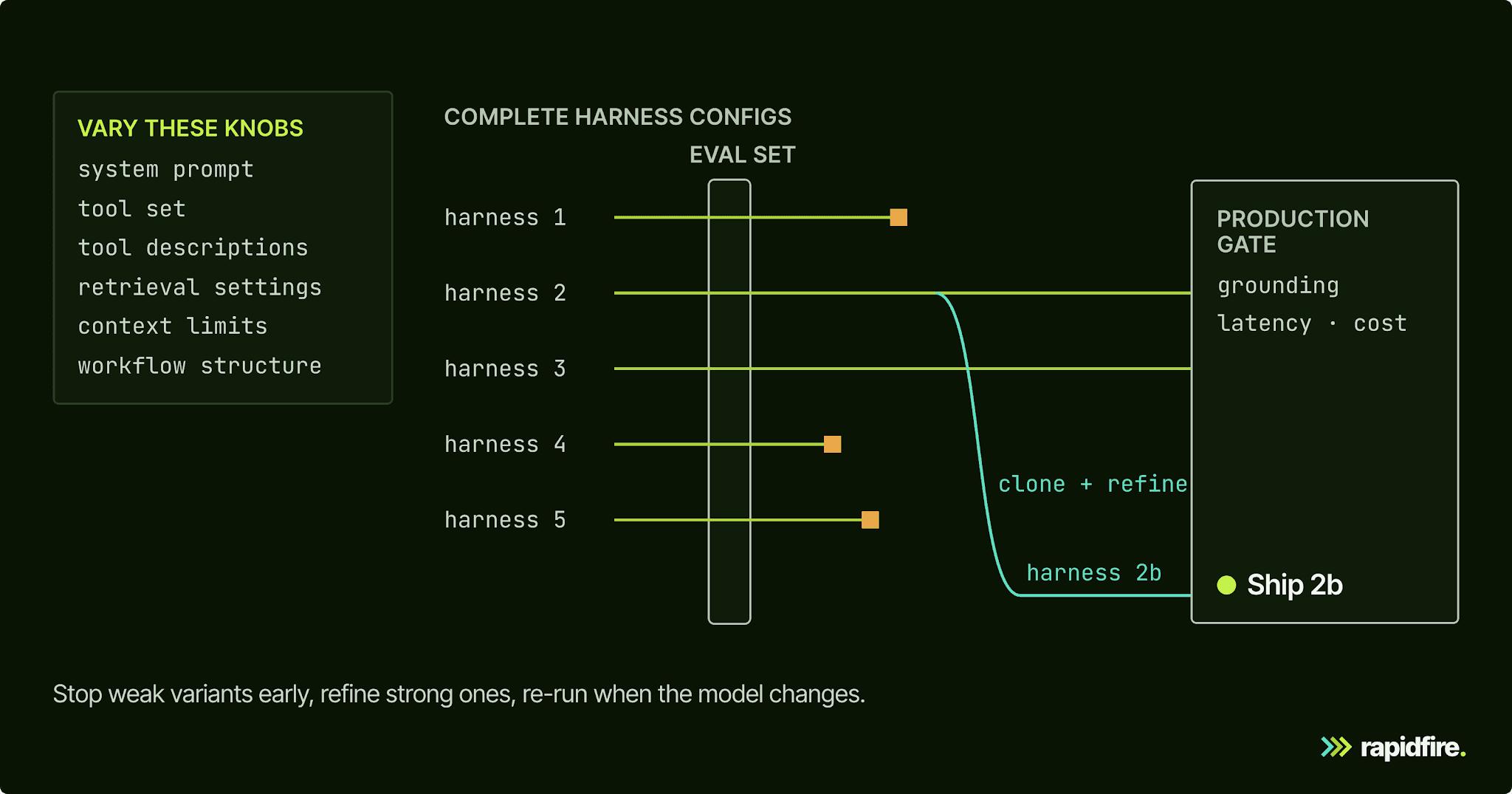
Compare harness changes, such as a system prompt, tool set, or context budget, against a fixed set of tasks. The following loop makes both regressions and gains visible:
Build an eval set from real-world tasks. Pull them from production logs, support tickets, and traces that show your agent's failure modes, and hold back a separate set you never tune on. Our guide to AI agent evaluation covers how to build one.
List the harness choices that might matter. Start with data pre-processing and retrieval, then the model and prompts, then the tool set and loop settings. An agent can't reason its way past bad context, so the data side usually deserves the first look.
Run variants side by side on the same evals, with the same scoring and model version. Agents are stochastic, so repeat runs before trusting a small gap.
Stop weak variants early and refine strong ones. Kill the clear losers, then clone the leaders and try variations around them.
Gate on grounding, latency, and cost. A winner has to clear your bar on every metric that matters, then hold up on the held-out tasks.
Re-run when the model changes. LangChain's Claude Opus 4.6 test scored 59.6% on an earlier harness version that hadn't been through the same improvement loop, below its tuned Codex result.
RapidFire AI supports this comparison process for the retrieval and context layer. It is an open-source (Apache-2.0) experiment engine for testing configurations offline, before deployment. It is not an agent harness.
You supply configurations and an eval set, and our engine runs the configurations concurrently. Results arrive in groups of examples called shards, with running metric estimates and confidence intervals for supported metrics configured with a type and value range. If the eval set is sorted or grouped, shuffle it first: the early estimates assume each shard is a random sample.
You don't wait for every run to finish. With Interactive Control Ops (IC Ops), you stop the weak configs, then clone the strong ones and modify them to explore around the leader. Metrics are user-provided Python functions, so you can score runs with exact match, a retrieval metric, or an LLM judge you write yourself.
In our open-source package, you can compare the choices that determine what information reaches the model: chunking, embeddings, search method and retrieval depth, rerankers, prompts, few-shot examples, and the generator model.
For a global automotive manufacturer's internal assistant, we compared 432 configurations across 7 axes in about two days of one AI engineer's work. The selected configuration beat both existing stacks on 5 of the 7 shared Ragas metrics. That result came from the team's own 28-question eval set, so it demonstrates the comparison process rather than a universal winning configuration.
The same study shows why one score is not enough. The selected configuration ranked first on Answer Correctness but only about 282nd on Faithfulness out of 432 configurations. Correctness measures how well an answer matches the reference; faithfulness checks whether its claims are supported by the retrieved context. A configuration can do well on one and less well on the other.
Changing the embedding model moved Faithfulness by about 0.02, while Answer Correctness changed by more than 0.2. Decide which outcomes matter for your application before selecting a winner. The open-source workflow described here compares retrieval and context settings, not complete agent workflow structures.
Conclusion
Evaluate the model and harness together: tool access, context handling, limits, and checks affect the agent's results. Treat harness choices like model choices: a fixed eval set, side-by-side runs, and a decision based on scores rather than whichever demo looked best.
To try that workflow on the retrieval and context side, open our RAG notebook on Colab. It compares four retrieval configs (two chunk sizes times two reranker settings) on a financial Q&A dataset in your browser, with no local install. If you're working on full agent workflows, talk to our team.
Agent Harness FAQ
What Is a Harness in an AI Agent?
An AI agent harness is everything except the model: the loop that calls the language model, the tools it can use, how context and memory are handled, what it's allowed to do, and how its work gets checked. An AI agent is the model plus that harness.
Which Is the Best Agent Harness?
There isn't one; the right agent harness depends on the task, the model, and your constraints. Judge candidates on model and tool support, control over context and permissions, built-in verification, trace quality, and above all, how they score on your own eval set.
Is OpenCode an Agent Harness?
Yes. OpenCode is an open-source coding agent that runs on whichever LLM provider you configure and supplies everything around the model: built-in tools, MCP server support, and per-tool permissions you can set to allow, deny, or require approval. That's a harness.
How Do You Develop an Agent Harness?
Start with a minimal loop, a few well-described tools, a sandbox, and a verification step. Then follow the measure-don't-guess workflow above: collect failing traces, change one thing, and score it on a fixed eval set before keeping it.
Do Harnesses Still Matter as Models Get Better?
Yes, though the work moves. As models improve, they need fewer workarounds, but something still has to sandbox tool calls, manage context, and check the work. In Anthropic's long-running coding experiments, Claude tended to mark features complete without testing them end to end. It did much better once the harness prompted it to test through browser automation the way a human user would.