Hybrid Search for RAG: How to Combine Keyword and Vector Retrieval
Written By:
Matt Tanner
Published on
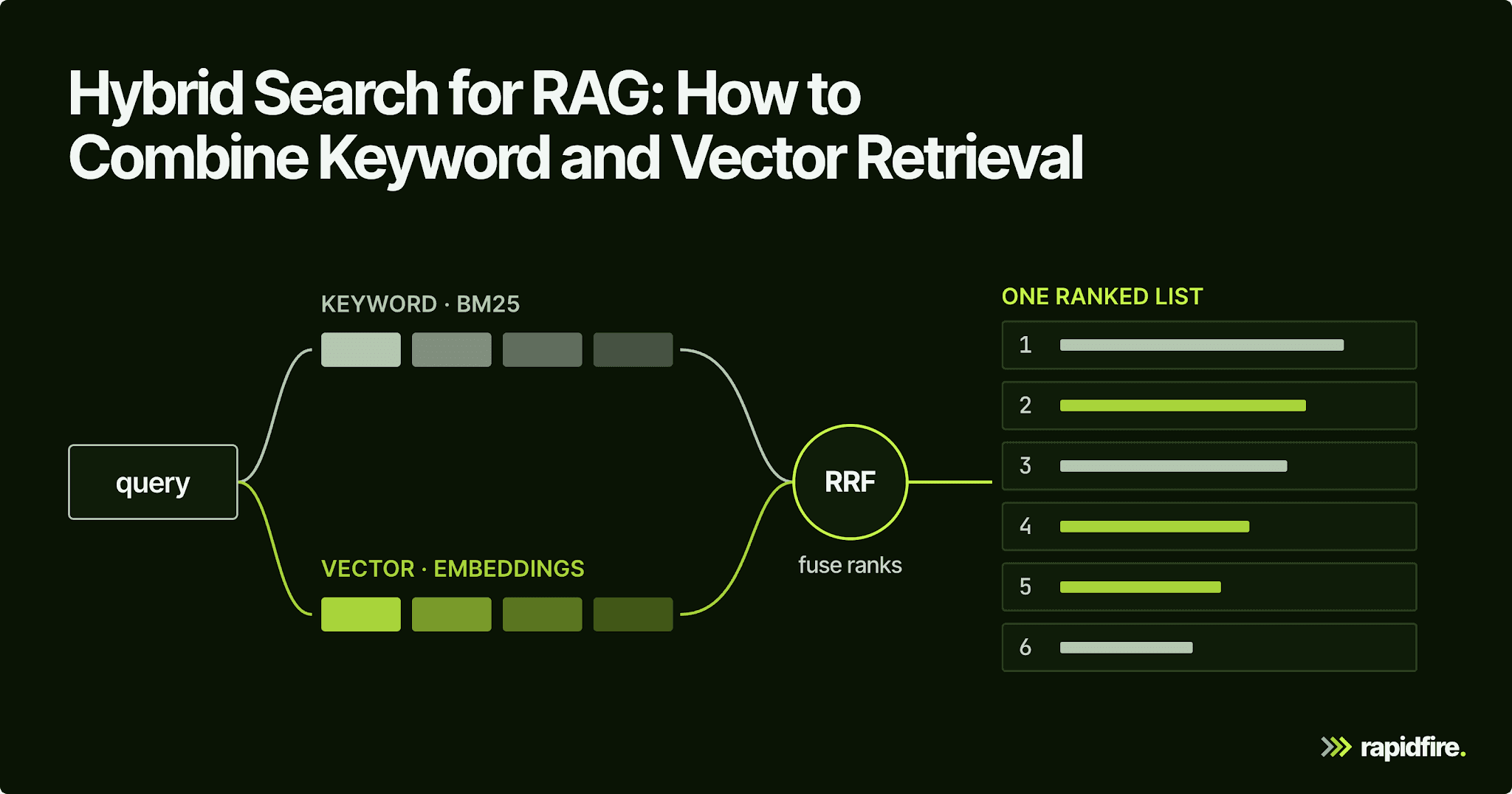
A user pastes the error code E4012 into your support assistant and asks what it means. The answer is sitting in your index, but vector search ranks the article about E4021 (ending in 21, not 12) first, and the model confidently explains the wrong error. In the small example later in this post, an off-the-shelf embedding model did exactly that: it ranked the E4021 chunk above the E4012 one.
Hybrid search adds lexical matching to a RAG system's vector retrieval. You run a keyword search next to the vector search and merge the two ranked lists, so exact identifiers and loosely worded questions both find their chunks. This guide covers how it works, the reciprocal rank fusion math, runnable LangChain code, when a second index isn't worth it, and how to tune it on your own eval set instead of borrowing someone else's weights.
What Is Hybrid Search in RAG?
Hybrid search in retrieval augmented generation (RAG) runs a lexical search, usually BM25, and a vector (semantic) search on the same query. It then merges the two sets of search results into a single ranked list before the top chunks go to the LLM. Keyword matching catches exact terms, semantic similarity catches paraphrases, and the merged list gets both.
In a RAG pipeline, hybrid search changes how you find the passages that will become the model's context. The rest of the pipeline can stay the same.
You may also see this called "dense plus sparse" retrieval. Dense vectors represent text through learned embeddings. Sparse vectors assign weights to terms, with most entries set to zero. BM25 provides a lexical signal; learned sparse models such as SPLADE use a neural model to assign term weights. Either can complement dense retrieval. The fusion method then decides how to combine their results.
Vector Search vs. Keyword Search
The two retrievers fail in opposite directions, which is the whole argument for running both.
Keyword search, also called lexical search, looks for the query's terms in your documents. That makes it useful when a single character matters, as with E4012 versus E4021. BM25 ranks these matches using three ideas: rare terms carry more weight, repeated terms help only up to a point, and document length is accounted for.
Those rules reduce the advantage of long documents and repeated common words. The rarity signal is called inverse document frequency; the limit on the benefit of repetition is term-frequency saturation.
Two parameters control the last two behaviors: k1 for saturation and b for length normalization. BM25 does not determine their best values for your corpus. Robertson and Zaragoza report that b between 0.5 and 0.8 and k1 between 1.2 and 2 work reasonably well in many experiments. Use those ranges as starting points, then tune on evaluated queries.
Vector search ranks chunks by meaning, which is why it's often called semantic search. You embed the query and every chunk with the same model and return the nearest neighbors, usually by cosine similarity. That's how "my invoice page won't load" can match a chunk about billing dashboard errors with no words in common.
Approach | How it matches | Strong at | Weak at | Typical tools |
|---|---|---|---|---|
Keyword search (BM25) | Shared query terms, weighted by frequency and rarity | Error codes, SKUs, product names, acronyms | Synonyms, paraphrases, typos | Lucene-based search engines, |
Vector search | Embedding similarity (cosine or dot product) | Paraphrases, user intent, natural language questions | Exact identifiers, rare jargon, near-identical codes | FAISS, pgvector, vector databases |
Hybrid search | Both, merged into one ranked list | Mixed query traffic, domain-specific terms | Extra index, extra latency, another knob to tune | Engines with native hybrid search, or two retrievers plus fusion |
Don't write off lexical search as legacy. Across the 18 datasets in the BEIR benchmark, BM25 held up as a strong zero-shot baseline, while dense retrievers often underperformed the other approaches tested. Your choice of embedding model matters, but a term match doesn't need the embedder to know that E4012 and E4021 are different things.
Vector retrieval can miss information that full-text search recovers. Combining the two gives your RAG pipeline another way to find relevant evidence when semantic matching alone comes up short.

How Hybrid Search Works
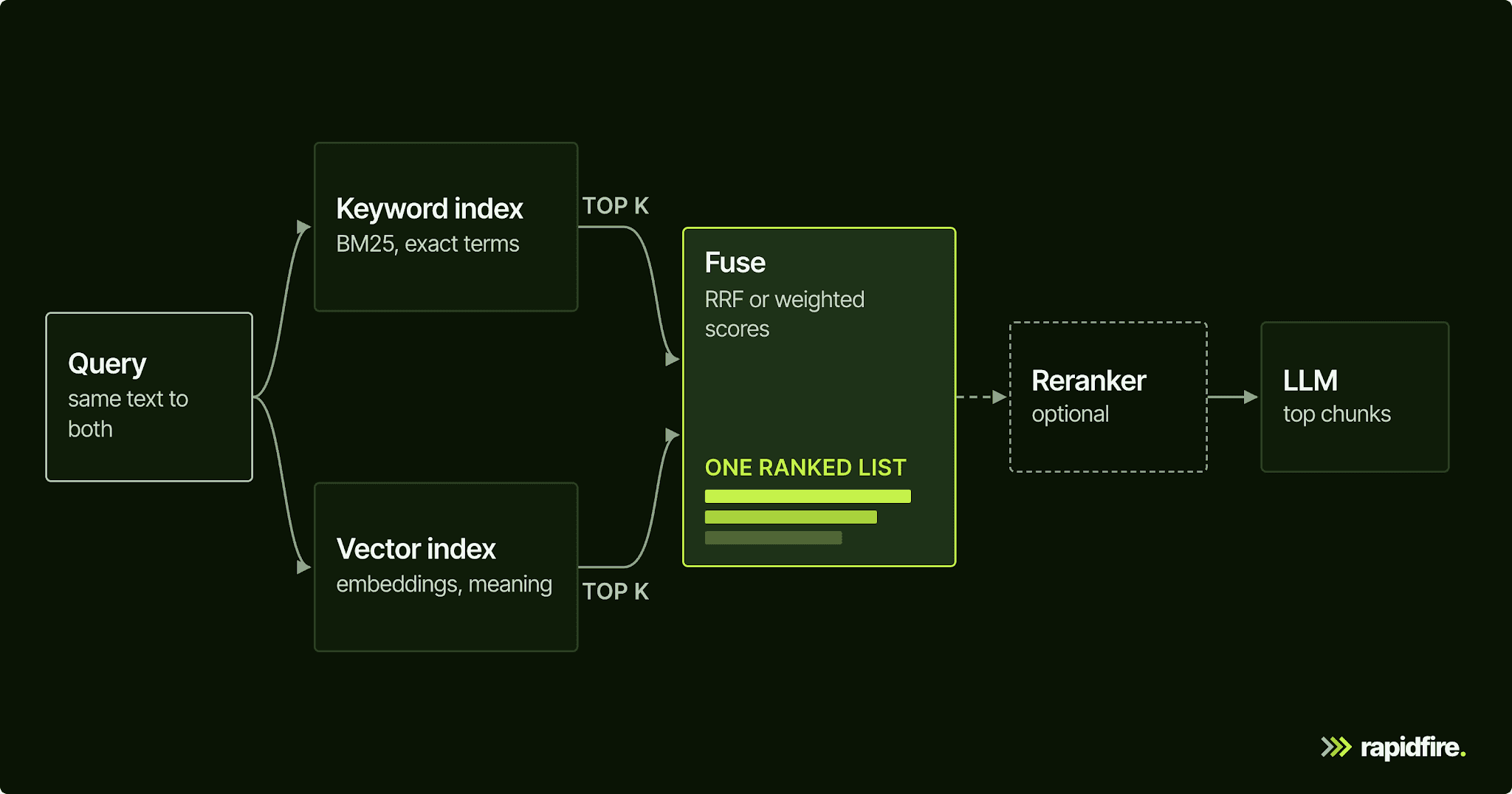
A hybrid search system adds two steps to plain vector retrieval, plus an optional third. You run both retrievers, fuse their results into one list, and optionally rerank that list before the top chunks go to the LLM.
Run Both Retrievers
Send the same query to a keyword index and a vector index built over the same chunks, and ask each for its own top k. Run them concurrently so you only wait for the slower one, and give every chunk the same ID in both indexes so fusion can tell when the lists share a chunk.
The per-retriever k matters more than it looks. Fusion can only promote what a retriever returned, so a chunk that's 15th for BM25 and 12th for vectors never gets a chance if each retriever stops at 10.
Fuse the Results
Reciprocal rank fusion (RRF) combines results by their positions in each list. A chunk gets credit for appearing near the top, and it gets credit from both retrievers if both return it. This avoids having to compare a BM25 score directly with a vector-similarity score.
For each list, the contribution is 1/(k + rank). Add the contributions for each chunk, then sort by the total. Here, k is a smoothing constant, not the number of results requested from a retriever. The original RRF paper used k = 60. Cormack, Clarke, and Buettcher found nearby values had little effect in their pilot; across their pilot and TREC runs, RRF improved mean average precision by 4 to 5 percent over Condorcet, CombMNZ, and the best individual system on average.
Here's the math for "What does E4012 mean?", using the ranked lists from the code below (its 0.5 weights halve every score but keep the order):
Chunk | BM25 rank | Vector rank | RRF score (k = 60) |
|---|---|---|---|
kb-101 (E4012: signing secret rotated) | 1 | 2 | 1/61 + 1/62 = 0.0325 |
kb-102 (E4021: body over 1 MB) | not returned | 1 | 1/61 = 0.0164 |
kb-106 (rotating an API key) | 2 | not returned | 1/62 = 0.0161 |
kb-105 (HTTP 429) | 3 | not returned | 1/63 = 0.0159 |
kb-104 (5xx retries) | not returned | 3 | 1/63 = 0.0159 |
Look at what happens to the error-code match. Appearing in both lists gives it two contributions, so it can overtake a chunk that appears first in only one list. With k = 60, first place contributes 0.0164 and second place contributes 0.0161. The small difference means agreement between retrievers carries substantial weight.
Reducing k gives the top positions more influence. There is also a limitation: RRF sees ranks, not match strength. In this example, kb-106 and kb-105 still receive credit even though their BM25 scores were zero.
Weighted score fusion uses the match scores themselves. First put the two score sets on comparable scales, then blend them:
α × vector score + (1 − α) × keyword score
Alpha controls the balance: a larger value gives vector search more influence. Scaling matters because BM25 and cosine similarity use different ranges. One option is min-max normalization, which maps each result set's scores to a common range; min-max is OpenSearch's default. Unlike RRF, this approach retains the size of the gap between candidates, so a clear first-place match can count for more than a narrow win.
RRF avoids score normalization, but it still has parameters. An analysis of fusion functions for hybrid retrieval by Bruch, Gai, and Ingber found RRF sensitive to its parameters. A tuned convex combination outperformed it in-domain and out-of-domain, and needed only a small labeled set to fit its one weight. Either way, you're picking a knob, and your data decides its value.
Optionally Rerank the Fused List
Fusion merges lists, but it doesn't read the text. A cross-encoder reranker does: it scores the query and each candidate together, so it can consider interactions that separate embeddings miss. But it produces no embedding you can index, so running it over the whole corpus for every query isn't practical. The standard pattern is to fuse a wide candidate set, rerank it, and keep the best few. Hybrid search builds the candidate set; reranking changes the candidates' order, as our guide to cross-encoder reranking covers.
When Hybrid Search Helps (and When It Doesn't)
Hybrid search helps most when the words in the query are the signal:
Technical docs and support content full of error codes, config keys, and version numbers.
Product catalogs, where SKUs and model numbers differ by a character.
Enterprise search over internal acronyms and project code names a general-purpose embedder never saw.
Domains far from the embedder's training data. In one ECIR 2022 study, combining lexical and dense retrieval gave an average 20.4% relative recall gain over the dense model and 9.54% over the lexical model on three out-of-domain datasets (Chen et al.).
It helps less when queries are conversational and the corpus is prose, because semantic search already handles paraphrase and BM25 can add noise. You can see that in the second query of the example below: vector search ranked the right chunk first, BM25 missed it entirely, and the fused list dropped it to third. Adding a cross-encoder reranker (ms-marco-MiniLM-L6-v2) moved it back to first.
Then there's the cost: a second index to keep in sync with every document update, a tokenizer to configure per language, extra latency, and another knob. That's not a reason to skip hybrid search, but it is a reason to confirm your failing queries are exact-term misses before adding the machinery.
How to Implement Hybrid Search in a RAG Pipeline
You can get hybrid search from your database or build it in your framework.
Option 1: A Database With Native Hybrid Search
Engine | How hybrid search works | Fusion knobs |
|---|---|---|
RRF retriever or linear retriever over a lexical query and a kNN query | RRF: | |
Hybrid query plus a search pipeline: a normalization processor, or a score-ranker processor for RRF |
| |
One hybrid query over BM25F and vectors |
| |
Query API with prefetch for dense and sparse queries |
| |
|
| |
Dense and sparse vectors in one index, or separate searches fused | Alpha weighting (single index) or RRF | |
Postgres + pgvector | Full-text search plus pgvector | Your own RRF, or a cross-encoder |
Option 2: Combine Two Retrievers in Your Framework
Without native hybrid search, LangChain's EnsembleRetriever fuses any set of retrievers with weighted RRF: each retriever's rank contributes weight / (rank + c), with c defaulting to 60.
This version runs locally with no API key. To run it:
Use a Python 3.12+ virtual environment.
Run the pip command.
Then save and execute the code as a Python script.
The first run downloads the MiniLM model; subsequent runs can reuse its local cache.
It prints document IDs for each retrieval method rather than generating an answer.
The BM25 adapter below is from langchain-community, which now emits a deprecation warning; the example was component-checked with langchain-community 0.4.2 and langchain-classic 1.0.8:
Running it prints:
The example exposes five implementation details to check:
BM25Retriever's default preprocessing is a whitespace split, soE4012.ande4012don't matchE4012. Pass your own tokenizer.There's no stemming unless you add it. The second query says "webhook signatures," the chunk says "signature" and "webhooks," and BM25 scored kb-103 at zero.
BM25Retrieveralways returns k results, even zero-score ones, and that padding still earns RRF credit. Keep k tight or filter them.Set
id_key, orEnsembleRetrieverdeduplicates onpage_content, which breaks when two indexes store the same chunk with different text.BM25Retrieverlives in the sunsetlangchain-communitypackage. Pin the example's versions, and consider your search engine's own retriever for production.
How to Tune and Evaluate Hybrid Search
Fusion weights are only part of the search space. Evaluate them alongside candidate counts, chunking, embeddings, and reranking on the queries your application needs to answer.
Build an Eval Set That Includes Exact-Term Queries
Build your evaluation around the failures you want to fix. Collect real queries, identify the chunks that answer each one, and separate exact-term lookups from paraphrased questions. Error codes, names, and flags belong in the first group.
Report results for both groups as well as the overall average. Otherwise, a mostly conversational test set can hide an improvement on identifier lookups. Keep some queries out of tuning entirely: choose weights and candidate counts on the development queries, then compare the final configurations on the untouched test queries. That checks whether the improvement extends beyond the examples used to choose the settings.
Start by asking whether the relevant evidence was retrieved. Recall@k measures how much of the labeled relevant material appears among the first k results. Then check its position: mean reciprocal rank (MRR) rewards placing the first relevant result near the top, while normalized discounted cumulative gain (NDCG) can account for several results with different relevance grades. Our guide to RAG evaluation metrics explains how to choose and interpret these measures.
Compare Pure Vector, Hybrid, and Hybrid Plus Rerank on the Same Metrics
Run at least three designs over the same eval set, scored the same way:
Config | What it tells you |
|---|---|
Pure vector search | Your baseline, and which queries it misses |
Hybrid (vector + BM25, fused) | Whether keyword matching recovers those misses (watch recall@k on the exact-term slice) |
Hybrid + rerank | Whether the recovered chunks reach the top few slots (watch MRR or NDCG) |
In one of our published case studies, we pinned the generator and embedder of a travel-insurance chatbot and swept 40 retrieval configs. The winner (512-token chunks, top 10 by similarity, cross-encoder rerank to 2) lifted a retrieval composite score from 0.439 to 0.627. This was a controlled demo scored against LLM-generated labels, not real-user outcomes; it measures retrieval tuning overall rather than hybrid against vector search.
Tune Fusion Weights and k With the Rest of the Pipeline, Not Alone
Fusion weights depend on the candidates available to combine. A different chunk size changes the words BM25 scores and the text the embedding model represents. A reranker can improve the order, but only if the relevant chunk made it into the candidate set.
That is why the best weight for one pipeline may not work as well after a chunking or retrieval change. Compare complete configurations rather than assume the weight can be tuned once and forgotten. Our guide to semantic chunking covers the chunking choices.
We built RapidFire AI to compare retrieval and context engineering configurations on the same evaluation data. It exposes settings such as chunk size and reranker depth, but its built-in search types are vector-based: similarity, similarity with a score threshold, and MMR. There is no built-in BM25, hybrid mode, or fusion-weight knob.
To use hybrid retrieval, plug in a custom LangChain retriever such as the EnsembleRetriever above, with fusion weights set in your code. The reranker can still run on its results, and its top_n setting can take a list of values to compare. This custom-retriever route is distinct from a built-in sweep over hybrid weights.
Use your own scoring functions to compute recall, NDCG, and MRR per config, keeping the definitions consistent across runs. For supported metrics, you can also inspect estimated results before the full eval set finishes. Declare each metric's type (algebraic or distributive) and value range to enable those estimates and confidence intervals.
RapidFire processes the eval set in groups called shards. Shuffle queries that are grouped by type before running the experiment, to reduce the risk of unrepresentative early shards. You can then use the partial results to decide whether to stop weak configurations and clone promising ones with different query-side settings, such as reranker depth or the generator.
Conclusion
Hybrid search covers what each retriever misses alone: BM25 finds the exact codes and names that embeddings blur, and semantic search finds the paraphrases BM25 can't see. Whether it helps your RAG system depends on your queries, so measure vector-only, hybrid, and hybrid plus rerank on an eval set with exact-term queries in it, and tune fusion together with chunking and reranking.
To try that loop, pip install rapidfireai and start with our FiQA RAG tutorial, which compares chunk sizes and reranker depths on retrieval metrics and also runs in Colab with no local setup. If you're planning this for a production retrieval stack, talk to our team.
FAQ
What Is Hybrid Search in RAG?
In RAG, hybrid search combines keyword search (usually BM25) with semantic search on the same query. A fusion step such as RRF merges the two ranked lists before the top chunks go into the prompt, so exact-term and meaning-based matches share the context.
Should I Use Vector Search or Hybrid Search for RAG?
Use hybrid search if users search for identifiers, product names, error codes, or jargon, or if your content is far from what the embedding model was trained on. If queries are conversational and the corpus is prose, vector search alone may be enough. Compare both on a labeled eval set before deciding.
What Is Reciprocal Rank Fusion?
Reciprocal rank fusion (RRF) merges ranked lists by position instead of score. Each document earns 1/(k + rank) from every list it appears in, and the totals are sorted; the original paper used k = 60. RRF needs no score normalization, but it can't tell a strong match from a weak one at the same rank.
Is Hybrid Search the Same as Reranking?
No. Hybrid search decides which chunks become candidates by combining two retrievers. Reranking reorders candidates you already have, usually with a cross-encoder that reads the query and each chunk together. They work well in sequence: fuse a wide candidate set, then rerank it.
Does Hybrid Search Slow Down Retrieval?
Somewhat. You query two indexes instead of one, but running them concurrently keeps the added latency close to the slower retriever, and fusion is cheap arithmetic over a few dozen ranks. The bigger costs are operational: a second index to keep in sync and another knob to tune.