Prompt Optimization: What It Is, Techniques That Work, and How to Run It
Written By:
RapidFire AI
Published on
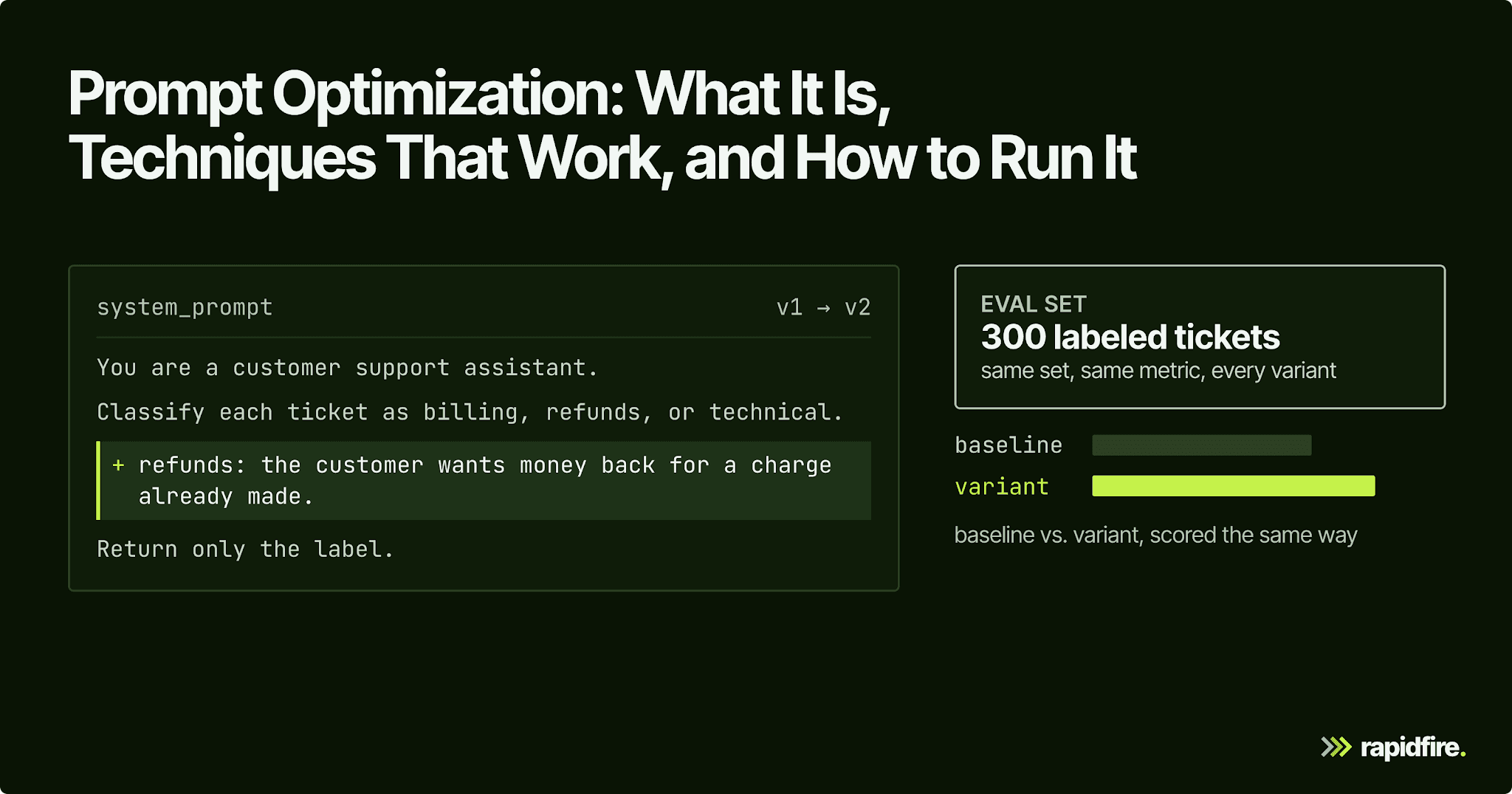
A customer support bot keeps promising refunds it can't give, so someone adds a sentence to the system prompt. The refund promises stop. Two weeks later, the bot is refusing ordinary billing questions too, and nobody connects it to that one-line edit.
A targeted prompt fix can also introduce regressions. Prompt optimization compares variants on a shared eval set so you can check both the intended fix and changes elsewhere. This guide covers techniques, tools, and a repeatable loop for deciding which variants to ship.
What Is Prompt Optimization?
Prompt optimization is the process of improving prompts based on measured results. You define a task metric and an eval set, then try prompt variants written by hand or proposed by an automated optimizer. Every variant gets scored the same way, and the best one wins.
Automatic prompt optimization (APO) uses software to propose and evaluate prompt changes. The search can cover instructions, few-shot examples, output format, and the order of the pieces, rather than wording alone. For a ticket classifier scored on 300 labeled tickets, the "prompt" is every token the model sees before the ticket.
Prompt Optimization vs. Prompt Engineering
Prompt engineering is how you write a prompt. Prompt optimization is how you decide which prompt wins.
Aspect | Prompt engineering | Prompt optimization |
|---|---|---|
Goal | Write a prompt that works | Find the prompt that scores best on your metric |
Method | Trial and error, guess and check | Score variants on a fixed eval set, keep the winner, repeat |
Inputs needed | Task knowledge, a few test inputs | An eval set with ground truth or a scoring rubric, plus a metric |
Who or what does it | Prompt engineers and developers | Developers, an automated optimizer, or both |
Output | A prompt that looks right | A prompt with a score, a baseline to compare against, and a record of what was tried |
Manual prompt engineering is still the first step of the optimization process, since someone writes the baseline prompt. Don't confuse either with prompt tuning. Prompt tuning learns continuous "soft prompts" through backpropagation against a frozen model. The result is a set of vectors, not text you can read or paste into an API call.
Why Prompt Optimization Matters
Even the presentation of a prompt can change the result. Sclar et al. varied separators, casing, and spacing while keeping the meaning of few-shot prompts the same. On LLaMA-2-13B, accuracy differed by up to 76 points across formats. This is a result from that study, not an expected gain from reformatting your own prompt. It shows why seemingly cosmetic changes deserve evaluation.
Sclar et al. found that format performance only weakly correlates between models. So a prompt tuned for last quarter's model may not be the best prompt for the new one.
Fixes also cause regressions. An optimized prompt can score worse than the original on particular inputs, even when the change helps elsewhere. If you only re-run the five examples that prompted the change, you'll see the fix and miss the breakage.
Then there's cost, because every instruction and example counts as input tokens on every call. A variant that adds 800 tokens of examples has to justify the added cost and latency with better accuracy at your production volume.
The Prompt Optimization Loop, Step by Step
Here's how to optimize prompts with a loop that works the same whether you edit by hand or let an optimizer propose changes.
Define the task and metric. Write down what a correct output is and pick the LLM evaluation metrics that score it: exact match for labels, field-level match for JSON, or LLM-as-a-judge scoring against a rubric for open-ended text.
Build an eval set. Pull real data (actual tickets, actual user questions) with known-good outputs, and include the edge cases you already know break things. Hold some of it back as a test split you don't look at while iterating. The rest is your development set.
Score a baseline prompt. Run your current prompt on the development set. That number is what every new prompt has to beat.
Group failures into patterns. Read the misses and cluster them into failure patterns, such as "refund requests labeled billing" or "dates in the wrong format."
Propose prompt variants. Make targeted changes that each address one of those failure patterns, or let an optimizer propose candidates.
Score all variants on the same set. Same development set, same metric, same model settings. Anything else isn't an apples-to-apples comparison.
Keep the winner, add regression checks. Promote the best-performing prompt, confirm it beats the baseline on the held-out test split, and turn the fixed failures into permanent test cases. Repeat when the model or data changes.
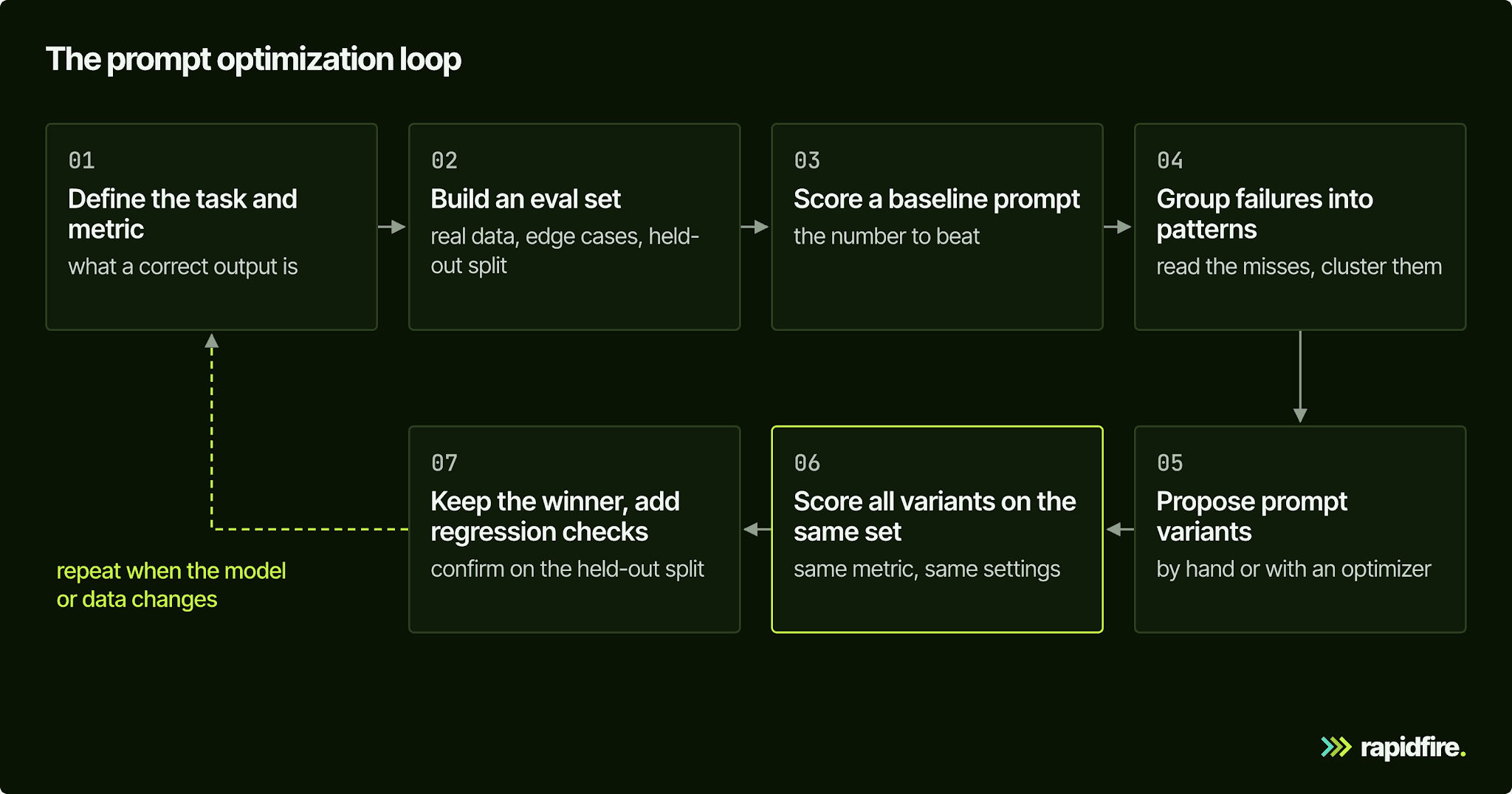
Steps 4 and 5 are the manual work that automated prompt optimization techniques take over.
Prompt Optimization Techniques
The first three techniques are things you write. The last four are automated prompt optimization methods that write candidates for you, and all of them still depend on the metric from step 1.
Clear Instructions and Structured Templates
Start by removing ambiguity. Define each label, state the output format, and separate instructions from inputs with consistent delimiters. Category definitions ("refunds: the customer wants money back for a charge already made") target the boundary cases a bare list of labels leaves to chance.
Few-Shot Example Selection
Examples show the model what a good answer looks like. The examples you choose, their number, and their order all change the score, and zero examples sometimes wins. We cover the details in our guide to few-shot prompting.
Chain-of-Thought and Output Format Constraints
In its original form, chain-of-thought prompting puts intermediate reasoning steps into the examples, which improves complex reasoning in large models. Format constraints, such as a fixed answer marker or a JSON schema, make outputs parseable. They also keep your metric honest, since a correct answer in the wrong format can still score zero.
Meta-Prompting
Meta-prompting uses a second LLM to rewrite the prompt. You show it the current prompt, sample inputs, outputs, and scores, and ask for a better version. APE (Automatic Prompt Engineer) is an early version of the idea: an LLM proposes a pool of candidate instructions, and the one that maximizes a score function wins.
Gradient-Style and Feedback-Driven Methods
Feedback-driven methods automate the failure analysis in the loop above. In ProTeGi (Pryzant et al.), an LLM reads a small batch of results and writes a critique of the current prompt. The method calls these critiques natural-language "gradients": they describe what needs to change rather than calculate numerical derivatives.
It then creates edits that address the critique and uses beam search to keep promising candidates. For the refund example, the useful feedback would identify which policy distinction the prompt failed to communicate. The next evaluation checks whether the proposed clarification actually helps.
Search and Evolutionary Methods (OPRO, GEPA)
OPRO proposes new prompts using a history of earlier candidates and their scores. Each new candidate is evaluated, and the result becomes evidence for the next proposal.
GEPA (Genetic-Pareto) also learns from previous attempts, but it reflects on execution traces: the steps the program took and the feedback those steps produced. It proposes updates and can combine lessons from candidates that work well on different examples, rather than keeping only one candidate throughout the search. Its authors report a gain of over 10% over MIPROv2 in their evaluation. GEPA prompt optimization is available in DSPy, where a metric can supply written feedback alongside a score.
Programmatic Optimization With DSPy
DSPy is useful when your application has several LLM steps to optimize. You describe each step's inputs and outputs with a typed signature, then supply examples and a scoring function. An optimizer searches for prompts that improve the program's measured result.
The MIPROv2 optimizer searches instructions and few-shot examples together. It builds candidate demonstrations, proposes instructions, and uses Bayesian optimization to choose combinations to test. The underlying MIPRO paper applies this process across the modules of a multi-stage program. This lets you optimize how the steps work together instead of polishing each prompt in isolation.
Prompt Optimization Tools
If you're shopping for a prompt optimizer, the options split into frameworks that propose prompts, eval platforms that score experiments, and engines that compare configurations you define. As of October 2026:
Tool | Type | How it optimizes | Best for |
|---|---|---|---|
Open-source experiment engine | Runs prompt variants you define (and the rest of the pipeline) in parallel against one eval set; doesn't write prompts | Comparing prompt, retrieval, and model settings together | |
DSPy | Open-source framework | MIPROv2, GEPA, and other optimizers tune instructions and examples against your metric | Multi-step LLM programs you're willing to write in DSPy |
MLflow | Open-source platform | optimize_prompts API with GEPA and metaprompting optimizers, tied to the Prompt Registry (MLflow 3.5.0+) | Teams already tracking prompts in MLflow |
LangSmith (promptim) | Evals platform plus experimental library | promptim runs an optimization loop over a prompt, a dataset, and your evaluators | LangChain and LangSmith users |
Open-source tracing and evals | Prompt playground and experiments; its optimization tutorials use Arize's separate Prompt Learning SDK or DSPy's MIPROv2 | Teams that want traces and prompt experiments in one place | |
Evals and experiments platform | Scored experiments; its Loop assistant can create and update prompts and scorers | Teams running evals in CI | |
OpenAI prompt optimizer | Dashboard feature | Rewrites a prompt using dataset annotations, critiques, and grader results | Not a good bet for new work: it's being retired (see below) |
OpenAI is retiring its dataset-backed prompt optimizer along with the Evals platform. Existing evals become read-only on October 31, 2026, and the dashboard and API are scheduled to shut down on November 30, 2026. If your loop depends on it, move your eval data and graders before the read-only date.
Optimize Prompts Together With the Rest of the Pipeline
A prompt comparison holds the surrounding application fixed, but those other settings also affect output. The best prompt depends on the model reading it, the context retrieved into it, and the examples next to it. A prompt optimized against one setup can lose once retrieval changes.
Retrieval improvements can help even when the prompt stays the same. In one of our case studies, we kept the generator fixed and changed the retrieval configuration of a chatbot. Its retrieval composite rose from 0.439 to 0.627 on questions synthesized from the source documents. That measures how well the pipeline retrieved evidence on this controlled benchmark.
Separate LLM-judge results suggested an answer-quality improvement too, but the baseline and sweep used different judge implementations. Their absolute scores were not directly comparable, so we reported that improvement qualitatively. Chunking controls which evidence reaches the model; the prompt shapes how the model uses it. Evaluate both as part of context engineering.
RapidFire AI compares the prompt variants you supply alongside the rest of the pipeline. In our prompt manager, you can vary instructions, examples, the example-selection method, and the number of examples (k). A List of values tells the experiment which alternatives to compare. The sketch below combines two instruction variants with two example counts, giving four configurations to evaluate.
This configuration sketch is not a standalone script:
Use the Python 3.12+ RapidFire setup from the tutorial.
Then define both prompt strings, a pool of at least five examples, a matching LangChain PromptTemplate, and the selector and embedding configuration first.
Attach the manager to a generator config and supply the eval dataset and preprocessing/scoring functions, following the linked GSM8K tutorial.
With other knobs fixed, the grid expands to four combinations: two instructions × two example counts.
Each combination runs on the same eval set, scored by the metric function you write. RapidFire processes the examples in groups called shards, so you can inspect partial results as the run progresses. Supported metric types and value ranges enable running estimates with confidence intervals; shuffle a grouped or sorted eval set first to reduce bias in those early estimates.
You can use the results to stop weak configurations, then clone promising ones and edit their prompt mid-run without rebuilding the document index. That makes it easier to explore a useful variation while the comparison is still running.
RapidFire AI doesn't generate prompts, but the instructions a DSPy or GEPA optimization run produces can go into the same List as your hand-written ones and compete head-to-head. API-only experiments don't need a GPU. Our GSM8K tutorial shows the pattern, comparing gpt-5-mini at two reasoning-effort levels and gpt-4o, each with two few-shot settings, across six configs.
Common Prompt Optimization Pitfalls
Overfitting to a small eval set. LangChain's benchmark of five optimization methods saw some optimized prompts overfit their training examples, and it recommends a separate test split. The more variants you try, the more likely one wins by luck.
Changing several things at once without tracking prompt versions. If the instruction, the examples, and the model all changed, you can't tell which one moved the score.
Using only five hand-picked test cases. Each example is 20% of the score, so five hand-picked inputs can't reveal a 3-point regression. It's the same logic behind our argument that rapid experimentation beats intuition when customizing LLMs.
Ignoring cost and latency. Track tokens per call next to accuracy.
Skipping regression checks after a model upgrade. Re-run the full eval set on the new model before you switch.
Trusting optimizer output that reads well. An optimized prompt can sound sharper and score worse, so it ships only if it wins on held-out data.
Optimizing one metric in isolation. In the case study's second example, a 432-config sweep for an automotive knowledge assistant, we picked the winner by a composite weighted toward Answer Correctness, and it ranked first on that metric but only about 282nd on Faithfulness. A vague judge metric makes this worse, since the optimizer ends up chasing the judge's biases.
Conclusion
Prompt optimization works when the prompt is treated as one tested setting, not a document someone polishes. Fix the metric and the eval set first, then let hand edits and optimizers compete on the same scores. Re-run the comparison whenever the model or the retrieved context changes.
To try it, open the RapidFire AI RAG notebook on Colab, which runs in the browser with no local setup. To run these comparisons on your own pipeline, talk to our team.
Prompt Optimization FAQ
What Are the 5 P's of Effective Prompting?
It's a teaching mnemonic, not a standard, and different courses fill in the five P's differently. Whichever version you learned, treat it as a checklist for writing the baseline prompt, then measure that prompt like any other.
What Are the 4 Steps of Effective Prompting?
There's no single official list either. A version that holds up in engineering terms: define the goal and metric, write a baseline, test it on real inputs, and refine based on the failures. That's the loop above, compressed.
What Is the Difference Between Prompt Optimization and Prompt Tuning?
Prompt optimization changes the text of a prompt and judges each version on an eval set. Prompt tuning trains soft prompt vectors with backpropagation while the model stays frozen, so it needs gradient access to the model.
Is DSPy a Prompt Optimizer?
Not exactly. DSPy is a Python framework for building LLM programs, and it ships several prompt optimizers, including MIPROv2 and GEPA.