LangGraph vs LangChain: Differences, Use Cases, and How to Choose
Written By:
RapidFire AI
Published on
If you learned LangChain from an older tutorial, you probably picture chains: a prompt, a model, and a parser piped together. LangChain v1 is built around create_agent instead, an agent loop that runs on LangGraph. So the LangChain vs LangGraph question comes down to how much of the control flow you want to own. Updated for LangChain and LangGraph v1, this guide covers what each one does, where LangSmith and Deep Agents fit, and how to choose.
LangGraph vs LangChain: The Short Answer
LangChain is an open-source agent framework: integrations for models, tools, and retrievers, plus create_agent, a minimal agent loop you customize with middleware. LangGraph is the lower-level runtime from the same company for graph-based workflows with explicit state management, loops, branching, persistence, and human-in-the-loop. LangChain's agents run on LangGraph, so if you build with create_agent, you're already running LangGraph.
LangChain | LangGraph | |
|---|---|---|
Role in LangChain's own framing | Agent framework | Agent runtime |
Who decides the next step | The model, inside create_agent's fixed tool-calling loop | Your edges, plus the model wherever you let it |
License | MIT | MIT |
Start here if | You want a working agent or RAG app quickly | You need custom control flow, or pauses outside tool calls |
What Is LangChain?
LangChain is an open-source framework for building LLM-powered applications, launched in October 2022. Many developers met it through chains composed with the LangChain Expression Language (LCEL) pipe syntax, prompt | model | parser. That's still how a basic RAG pipeline reads: retrieve, put the context in a prompt, and generate.
Version 1.0, released October 20, 2025, moved the center of gravity to agents. create_agent replaced LangGraph's old create_react_agent prebuilt as the standard way to build one. The model chooses a tool, receives its result, and continues until the task is complete. You shape that loop with middleware, which can summarize long conversation history, redact PII, or require approval for sensitive tool calls. Legacy chains like LLMChain moved to a separate langchain-classic package.
The integrations layer didn't change. Chat models for OpenAI, Anthropic, Google, and other large language model providers, plus embeddings, vector stores, document loaders, and retrievers, all work whether or not you ever call create_agent.
What Is LangGraph?
LangGraph is the low-level orchestration framework and runtime LangChain Inc. introduced in January 2024 for long-running, stateful agents. You build a StateGraph from a shared state schema plus nodes and edges: nodes are functions that read state and return updates, and edges decide which node runs next. Edges can be fixed or conditional, and they can point backward, so cycles are part of the graph instead of an outer while loop you write yourself.
Around the graph, the runtime adds durable execution, streaming, human-in-the-loop interrupts, and persistence through checkpointers. It deliberately doesn't abstract prompts or architecture. That's a cost when you just want an agent, and the whole point when you need deterministic and LLM steps in one workflow.
Typical LangGraph use cases: an invoice pipeline where only extraction calls an LLM, or a support agent that drafts a reply, waits for a human, and revises. For a hands-on build, see our step-by-step LangGraph tutorial.
Key Differences Between LangChain and LangGraph
LangChain | LangGraph | |
|---|---|---|
Abstraction level | High: create_agent plus integrations | Low: you define state, nodes, and edges |
Control flow | Forward-only chains, or one fixed model-and-tools loop | Any graph: branches, cycles, deterministic and LLM steps mixed |
State management | Chains pass outputs forward; agents keep messages plus optional custom fields | Typed state schema with a reducer per key |
Memory and persistence | Conversation memory via a checkpointer and thread_id | A checkpoint at every step, per thread |
Human-in-the-loop | Middleware that pauses on chosen tool calls | interrupt() anywhere inside a node |
Error handling and resume | Retry middleware; checkpoints come from LangGraph underneath | Resume from the last successful step |
Multi-agent support | Subagent, handoff, and router patterns | Subgraphs and custom multi-agent workflows |
Learning curve | Lower; no LangGraph knowledge needed | Steeper: state schemas, reducers, graph design |
Best for | RAG Q&A, tool-using assistants, prototypes | Branching, long-running, approval-gated workflows |
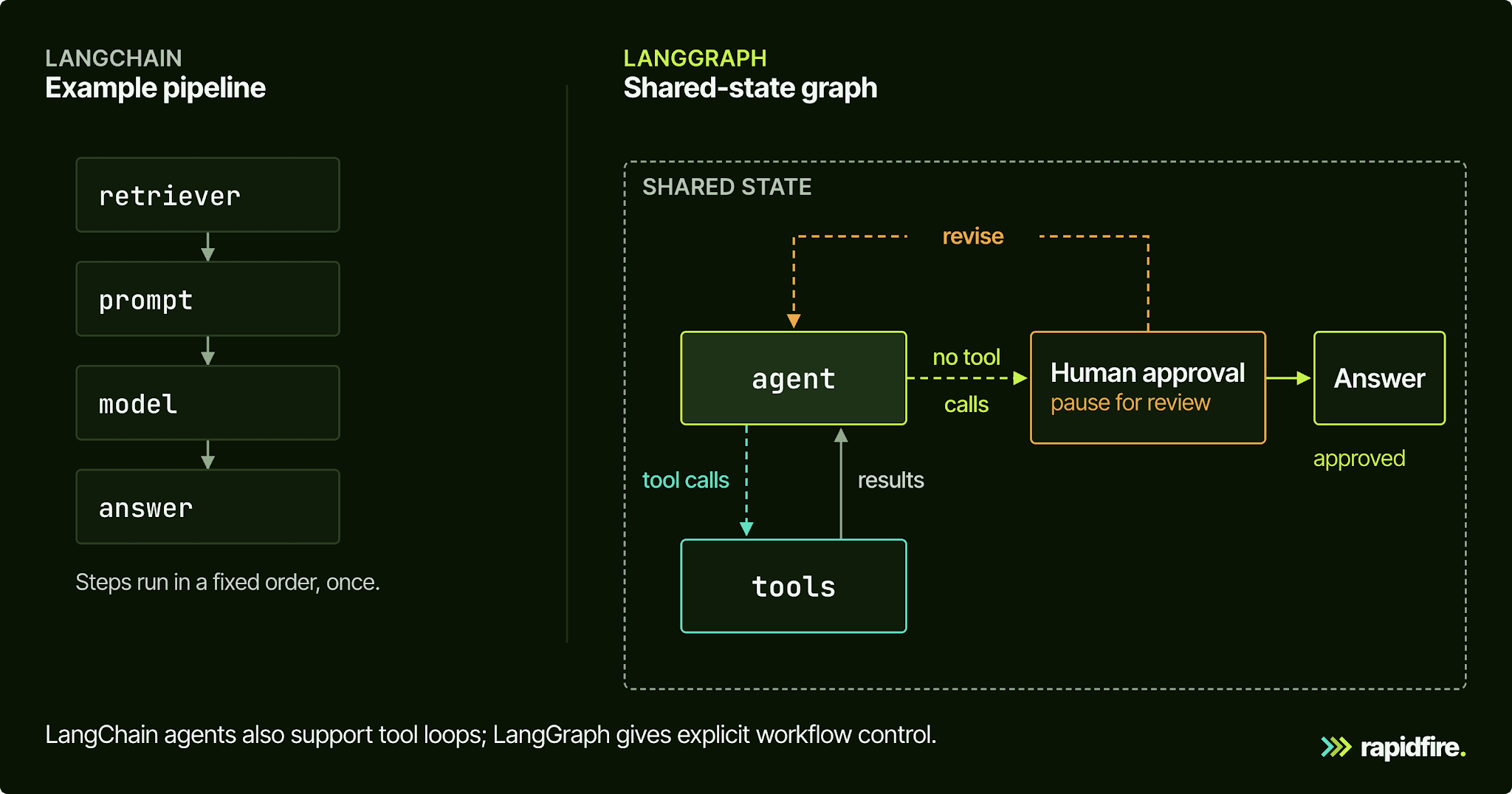
Control Flow: Pipelines vs. Loops
A LangChain pipeline moves forward. The | operator builds a sequence where each runnable's output feeds the next, which suits linear workflows like retrieve-then-answer or extract-then-save. create_agent adds one loop, model to external tools and back, until the model stops calling tools. Middleware can wrap each step and even jump to the model, the tools, or the end, but it works inside that loop rather than adding new paths.
LangGraph treats the loop as something you design. A conditional edge after a grading node can send the run back to retrieval, forward to an answer, or out to a person. Because cycles are legal, so are runaway loops. LangGraph caps each run with a recursion limit and raises GraphRecursionError when a run hits it. Set recursion_limit explicitly for your workflow rather than relying on a version-specific default, and give every retry path an attempt counter in state.
State: Implicit vs. Explicit
In a chain, state is whatever you hand to the next step. A create_agent agent keeps a list of messages in its state, and with a checkpointer and a thread_id it can maintain context across calls. You can add a draft, a retry count, or reviewer notes by subclassing AgentState. During a run, though, they change only through tools and middleware at fixed points in the loop.
LangGraph makes state the first thing you define, usually a TypedDict or Pydantic schema that every node reads. Nodes return partial updates, and each key's reducer decides how they merge. With no reducer, the new value overwrites the old one, which is why message lists use an appending reducer. That's more typing up front, and it pays off in multi-agent systems that share named fields.
Human-in-the-Loop and Resuming After Failure
Both frameworks can pause for human review. In LangChain, HumanInTheLoopMiddleware checks each tool call against a policy and pauses before the ones you flag.
Create an agent that pauses before refunding
The refund example below creates a support agent with an issue_refund tool. That tool only returns a mock message; it never moves money. Use Python 3.10+, install langchain, langgraph, and langchain-openai, and set OPENAI_API_KEY in your environment. Model calls use your API account.
Run this setup first. It defines the mock tool and assigns a configured agent to the agent variable. It does not process a refund request yet:
Continue that setup below in the same script, or in subsequent cells of the same notebook session. The following steps use the agent you just created.
Send a request to that agent. This call starts the model-and-tools loop with a request for a $10 refund. The config names the conversation refund-demo, and result stores the returned state:
Read the printed interrupt. If the model proposes issue_refund, __interrupt__ contains the call awaiting approval; the mock has not run. Review the proposed tool and arguments. If the entry is empty, there is no paused call to approve.
Resume the paused agent after review. Run the next block in the same session. It reuses the agent and config from step 1 and passes an approval decision to the middleware:
The example approves one pending action. Supply one decision per pending action in its listed order. Resuming lets the mock tool run and the agent continue; the mock still moves no money.
The middleware also supports edit, reject, and respond; respond supplies a human answer for an ask-user tool and should not be used to deny a refund.
The catch is scope, because the middleware only gates tool calls. LangGraph's interrupts can sit anywhere inside a node, so you can pause on a draft, a plan, or a generated SQL statement before it becomes a tool call. Under both, the pause is a LangGraph checkpoint. Checkpoints also cover error handling: if a node fails, you resume from the last successful step instead of repeating earlier model calls.
Where LangSmith and Deep Agents Fit
The stack has three open-source layers: LangGraph supplies the execution runtime, LangChain provides the agent framework, and Deep Agents assembles a harness around it. LangSmith sits beside all three.
Layer | Product | What you get |
|---|---|---|
Harness | Deep Agents | Planning, subagents, a virtual filesystem, context management |
Framework | LangChain | create_agent, middleware, integrations |
Runtime | LangGraph | State graphs, durable execution, streaming, interrupts |
Platform | LangSmith | Tracing, evaluation, prompts, deployment |
Deep Agents combines LangChain's core agent with middleware for capabilities such as planning, files, and subagents, running on LangGraph underneath. LangChain recommends it as a starting point for more open-ended work, such as research or coding. A RAG bot with a known path may need fewer of those capabilities. If the term is new, read what an agent harness is.
LangSmith traces, evaluates, and deploys agents built on these layers. It also offers a no-code builder, LangSmith Fleet, that creates agents from a description or a template.
When to Use LangChain vs. LangGraph
Start with LangChain if:
You're building question answering over your own documents.
Your AI agent's job fits one loop: call external tools until the task is done.
You're prototyping and want to swap models and vector stores freely.
Your human approvals happen at tool calls, which middleware already handles.
Reach for LangGraph if:
You need loops and retries you control, like draft, grade, and revise.
Different inputs should take different paths through the workflow.
Your long-running, resumable workflow also needs steps beyond the model-and-tools loop. A create_agent agent with a durable checkpointer already picks up where it left off on the same thread.
Approval points sit somewhere other than a tool call.
You need multi-agent coordination over shared state, or deterministic steps between agent steps.
Start with LangChain's model and tool abstractions. Use LangGraph directly when you need control beyond create_agent's loop, such as custom branches or approvals inside a node.
Using LangChain and LangGraph Together
The layers are designed to compose, so a create_agent agent can be one node in a larger graph. The simpler pattern runs LangChain components inside LangGraph nodes.
Create a graph that pauses for draft review
This is a separate RAG example, not a continuation of the refund agent. It retrieves documents, drafts an answer, and pauses for a person to approve it or request a revision. Supply an existing, populated LangChain vector_store, and use the same package setup and OPENAI_API_KEY as above.
Run this setup first. It defines the three node functions, connects them, and compiles them into a graph. The workflow does not run until you call graph.invoke:
The node bodies are ordinary LangChain calls, so the same retriever and model would work unchanged inside a create_agent tool function.
Continue in the same script or notebook session, using the graph just compiled. Keep its InMemorySaver instance alive while the run is paused.
Run the graph with a question. The config below gives this example its own draft-demo thread and a recursion limit. graph.invoke runs retrieval and drafting, then pauses inside human_review:
Read the printed draft awaiting review. The __interrupt__ entry contains the draft passed to interrupt inside human_review. The graph has saved its state and is now waiting for your decision.
Choose approval or revision. To accept the draft, run the block below in the same session. It resumes the existing graph with the same config. The approval becomes the decision inside human_review and ends the graph:
The final line prints the approved draft. If you want a revision instead, run the following block in place of the approval block. It sends your feedback back to write_draft and prints the next review pause:
Whichever You Pick, Test Configurations Before You Ship
Choosing LangChain or LangGraph decides how your app is wired, not whether the answers are good. Quality comes from the configuration inside the nodes: how you pre-process, chunk, and retrieve data first, then which language model and prompt you use. Compare whole configurations on the same eval set to see whether a gain on one question introduces a regression on another.
We built RapidFire AI for that step, to work alongside your framework. Our open-source retrieval and context engineering APIs wrap LangChain. The RAG spec takes LangChain text splitters and retrievers, the prompt manager wraps LangChain's few-shot example selectors, and many knobs accept a list or range of values. One spec becomes many configs, all scored on the same eval set with metric functions you write. While runs are in flight, you can stop the weak configs, then clone the strong ones and change their query-time retrieval, reranking, prompt, or generator settings to explore nearby options. Document preprocessing, including chunking, stays fixed in a clone because it shares the parent's index.
In a published case study, we swept 40 retrieval configs for a travel-insurance policy chatbot while holding the generator and embedder fixed. The winner lifted the retrieval composite score from 0.439 to 0.627, about 43 percent on that benchmark. For a LangGraph agent, tune the retrieval and prompt layers its nodes call before you evaluate the agent end to end.
Conclusion
LangChain gets you building blocks and a working agent loop quickly, and LangGraph gives you ownership of state and control flow once that loop stops fitting. LangChain v1 runs on LangGraph, so you can start with its agent loop and move to a custom graph when you need different control flow. Whichever you use, measure the configurations inside it before you ship.
To see that measurement in practice, open the RapidFire AI RAG notebook on Colab. It builds a RAG pipeline from LangChain components and compares chunk sizes and reranker settings on retrieval metrics, with no local install. To run locally instead, follow the RAG and context engineering quickstart; rapidfireai runs on a CPU-only machine when you use only closed model APIs for both embeddings and generation. Weighing configurations for an agent workflow? Talk to our team.
LangGraph vs LangChain FAQ
Is LangGraph Owned by LangChain?
Yes. LangGraph is built by LangChain Inc., the company behind LangChain, and both are MIT-licensed open-source projects.
Should I Learn LangChain or LangGraph First?
LangChain, then LangGraph once you need control that the agent loop doesn't give you.
Is LangGraph Still Relevant?
Yes. LangChain 1.0 is built on top of LangGraph, and so is Deep Agents. LangGraph reached v1.0 alongside LangChain on October 20, 2025.
What Is LangChain vs LangGraph vs LangSmith?
LangChain is the agent framework, LangGraph is the runtime that executes stateful graphs, and LangSmith is the platform for tracing, evaluating, and deploying what you build with either.
Can You Use LangGraph Without LangChain?
Yes. pip install langgraph pulls in langchain-core but not the langchain package, and a node can be any Python function. The dependency actually runs the other way, since langchain depends on langgraph.