rapidfire.

LangGraph Tutorial: How to Build an AI Agent With LangGraph (and Get It Production Ready)

Written By:

RapidFire AI

Published on

A customer asks whether order A-1001 qualifies for a refund. To answer, your support agent needs both the order details and the refund policy, then has to connect the two. LangGraph lets you build that workflow explicitly, including the tool calls, the return to the model, and the point where the agent stops.

In this LangGraph tutorial, you'll build that agent in Python, add conversation memory and a human approval step, then evaluate its answers before comparing prompts and models. Each addition builds on the same working example.

What Is LangGraph?

LangGraph is an open-source, low-level orchestration framework and runtime from LangChain Inc. for building long-running, stateful AI agents. You model the agent as a graph-based workflow: nodes do the work, edges decide what runs next, and a shared state carries data between steps. It supports loops, conditional branching, persistence, and human-in-the-loop pauses.

Use LangGraph when an agent needs to loop (call a tool, read the result, and decide again), branch on what the model said, pause for a person, or coordinate several agents. You can also mix hard-coded steps with LLM-driven ones in the same graph.

It's built by the LangChain team, but you can use LangGraph independently. This tutorial pairs them: LangChain supplies model and tool integrations, while its higher-level create_agent runs on LangGraph. For the full breakdown, read how LangGraph differs from LangChain.

One version note before you copy code from older posts. LangGraph 1.0 shipped in October 2025 as a stability release that kept state, nodes, and edges unchanged, but it deprecated the create_react_agent prebuilt, so older examples built on it need updating.

Core Concepts: State, Nodes, Edges, and the Graph

Our support agent needs shared conversation data, functions that call the model and tools, and rules for what happens next. These become the state, nodes, and edges of a graph, which you compile before running.

State

State is the shared data structure that nodes read and update, usually defined with a TypedDict. For a support conversation, you want new messages to join the history while an updated order ID replaces the previous one. Reducers control that behavior for each state key:

from typing import Annotated

from typing_extensions import TypedDict
from langchain.messages import AnyMessage
from langgraph.graph.message import add_messages

class State(TypedDict):
    messages: Annotated[list[AnyMessage], add_messages]  # reducer: append, don't overwrite
    order_id: str  # no reducer: each update replaces the old value
from typing import Annotated

from typing_extensions import TypedDict
from langchain.messages import AnyMessage
from langgraph.graph.message import add_messages

class State(TypedDict):
    messages: Annotated[list[AnyMessage], add_messages]  # reducer: append, don't overwrite
    order_id: str  # no reducer: each update replaces the old value
from typing import Annotated

from typing_extensions import TypedDict
from langchain.messages import AnyMessage
from langgraph.graph.message import add_messages

class State(TypedDict):
    messages: Annotated[list[AnyMessage], add_messages]  # reducer: append, don't overwrite
    order_id: str  # no reducer: each update replaces the old value

The add_messages reducer appends new messages and updates existing ones by ID, while order_id has no reducer, so each update replaces its value. For the agent below, we'll use LangGraph's prebuilt MessagesState, which already defines the messages key and its reducer, and add a counter for model calls.

Nodes

Nodes are Python functions that receive the current state and return the keys they want to change. In our support agent, one node will call the model and another will execute its requested tools. Both contribute messages to the same conversation history.

LangGraph groups execution into "super-steps": nodes that run in parallel share a super-step, while sequential nodes take separate steps. Keep that distinction in mind when setting a recursion limit later; it limits graph steps, not just model calls.

Edges and Conditional Edges

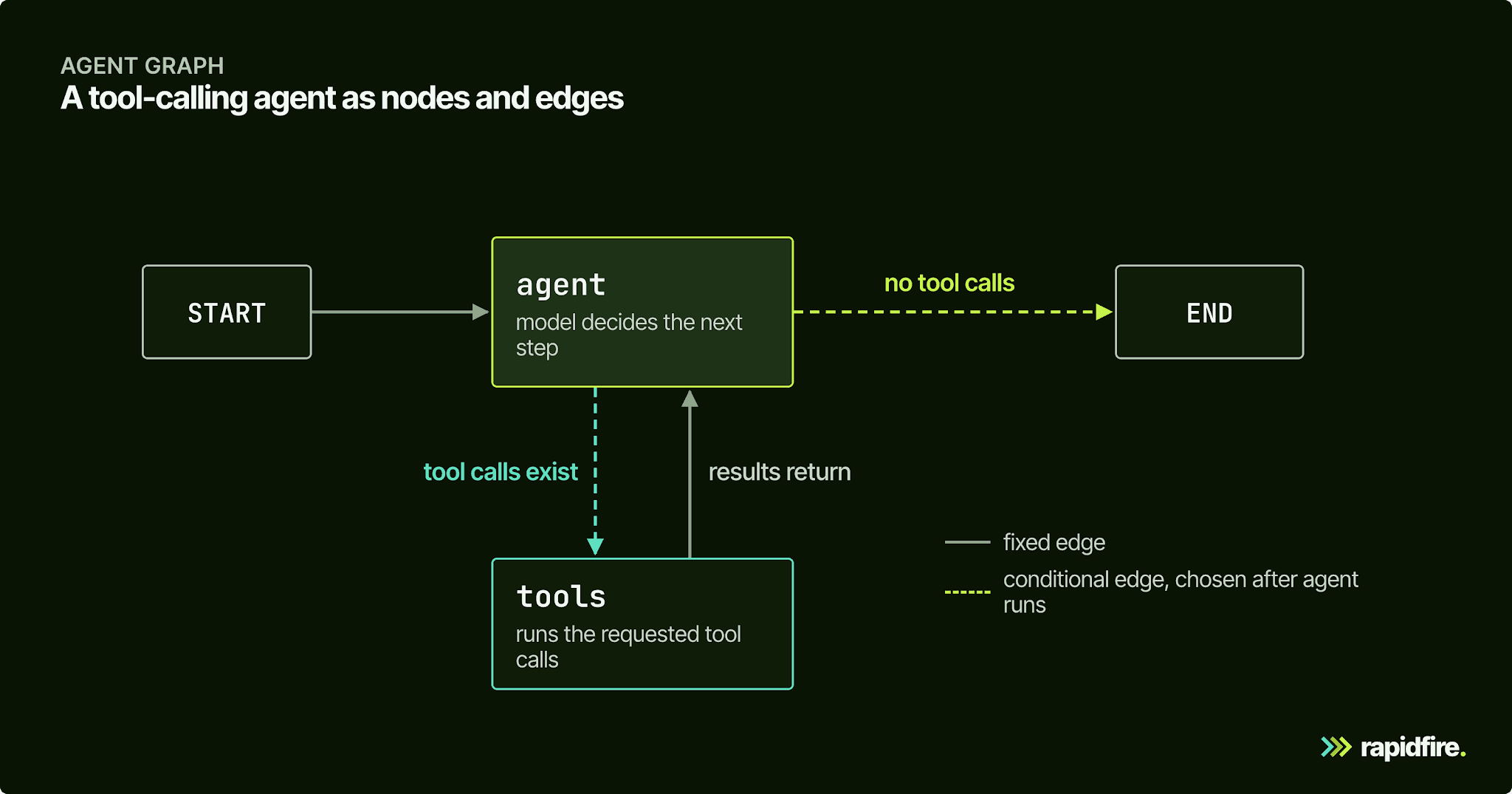
Edges decide what runs next. A normal edge always goes from A to B. A conditional edge calls a routing function after a node finishes, and the function's return value names the next node. The special START node marks the entry point, and END stops the run.

Conditional edges are where an agent makes decisions. Ours uses exactly one: after the model responds, check whether it asked for a tool, and if it did, run the tool and loop back to the model. That's the ReAct pattern from Yao et al.'s ReAct paper, which has large language models interleave reasoning with actions such as tool calls.

LangGraph Tutorial illustration

Once the nodes and edges are connected, compile() checks the graph's structure and creates the runnable graph. For example, an edge pointing to a missing node raises ValueError: Found edge ending at unknown node. Compilation is also where we'll attach a checkpointer when we add memory; first, let's install what the basic agent needs.

Set Up Your Environment

You'll need Python 3.10 or newer and an Anthropic API key with access to Claude. We'll use LangChain's init_chat_model to connect to the model, following LangGraph's own quickstart. Run the commands below in a macOS or Linux terminal, replacing the API-key placeholder with your own key; leave out the optional LangSmith lines unless you have a LangSmith key and want tracing.

python -m venv .venv && source .venv/bin/activate
pip install -U langgraph "langchain[anthropic]"

export ANTHROPIC_API_KEY="sk-..."

# Optional: send traces to LangSmith
export LANGSMITH_TRACING=true
export LANGSMITH_API_KEY="..."
python -m venv .venv && source .venv/bin/activate
pip install -U langgraph "langchain[anthropic]"

export ANTHROPIC_API_KEY="sk-..."

# Optional: send traces to LangSmith
export LANGSMITH_TRACING=true
export LANGSMITH_API_KEY="..."
python -m venv .venv && source .venv/bin/activate
pip install -U langgraph "langchain[anthropic]"

export ANTHROPIC_API_KEY="sk-..."

# Optional: send traces to LangSmith
export LANGSMITH_TRACING=true
export LANGSMITH_API_KEY="..."

To use OpenAI instead, install "langchain[openai]", set OPENAI_API_KEY, and change the model string to "gpt-5.5".

The examples were tested with the following versions. The install command above fetches the latest releases; use these versions if you need to reproduce the same environment:

Package

Version

langgraph

1.2.14

langchain

1.4.4

langchain-core

1.6.9

langchain-anthropic

1.7.5

Python

3.13

Model responses can vary, including their wording and the order of tool calls. Use the outputs below to understand the workflow rather than expecting an exact text match.

How to Build an AI Agent With LangGraph, Step by Step

We'll build a customer support agent for an API product, using one tool to search help docs and another to look up orders. The first question will be whether order A-1001 is refundable, which requires both sources. Create a Python file and add the blocks from Step 1 onward in order, or run them as consecutive notebook cells; the later memory and evaluation examples reuse these definitions.

Step 1: Define the State

Start with the conversation history and a model-call counter. We'll reuse this state in every version of the agent.

from langgraph.graph import MessagesState

class AgentState(MessagesState):
    llm_calls: int
from langgraph.graph import MessagesState

class AgentState(MessagesState):
    llm_calls: int
from langgraph.graph import MessagesState

class AgentState(MessagesState):
    llm_calls: int

MessagesState supplies the messages list and add_messages reducer, so nodes can return only their new messages. The llm_calls counter tracks model calls in the current state: per question in our stateless examples, and cumulatively across a thread once we add memory.

Step 2: Define Tools

Now give the agent two ways to retrieve evidence, using local data so you can focus on tool calling.

from langchain.tools import tool

DOCS = {
    "refund": "Annual plans can be refunded within 30 days of purchase. Monthly plans are not refundable.",
    "rate limit": "The free tier allows 60 API requests per minute. Paid plans allow 600.",
    "sso": "SAML single sign-on is available on the Enterprise plan only.",
}

ORDERS = {
    "A-1001": {"plan": "annual", "amount": 480.00, "days_since_purchase": 12},
    "A-1002": {"plan": "monthly", "amount": 40.00, "days_since_purchase": 3},
}

@tool
def search_docs(query: str) -> str:
    """Search the help docs for policies, limits, and plan features."""
    hits = [text for topic, text in DOCS.items() if topic in query.lower()]
    return "\n".join(hits) or "No matching docs found."

@tool
def get_order(order_id: str) -> str:
    """Look up an order by ID (format A-1234). Returns plan, amount, and days since purchase."""
    order = ORDERS.get(order_id.upper())
    return str(order) if order else f"No order found with ID {order_id}."
from langchain.tools import tool

DOCS = {
    "refund": "Annual plans can be refunded within 30 days of purchase. Monthly plans are not refundable.",
    "rate limit": "The free tier allows 60 API requests per minute. Paid plans allow 600.",
    "sso": "SAML single sign-on is available on the Enterprise plan only.",
}

ORDERS = {
    "A-1001": {"plan": "annual", "amount": 480.00, "days_since_purchase": 12},
    "A-1002": {"plan": "monthly", "amount": 40.00, "days_since_purchase": 3},
}

@tool
def search_docs(query: str) -> str:
    """Search the help docs for policies, limits, and plan features."""
    hits = [text for topic, text in DOCS.items() if topic in query.lower()]
    return "\n".join(hits) or "No matching docs found."

@tool
def get_order(order_id: str) -> str:
    """Look up an order by ID (format A-1234). Returns plan, amount, and days since purchase."""
    order = ORDERS.get(order_id.upper())
    return str(order) if order else f"No order found with ID {order_id}."
from langchain.tools import tool

DOCS = {
    "refund": "Annual plans can be refunded within 30 days of purchase. Monthly plans are not refundable.",
    "rate limit": "The free tier allows 60 API requests per minute. Paid plans allow 600.",
    "sso": "SAML single sign-on is available on the Enterprise plan only.",
}

ORDERS = {
    "A-1001": {"plan": "annual", "amount": 480.00, "days_since_purchase": 12},
    "A-1002": {"plan": "monthly", "amount": 40.00, "days_since_purchase": 3},
}

@tool
def search_docs(query: str) -> str:
    """Search the help docs for policies, limits, and plan features."""
    hits = [text for topic, text in DOCS.items() if topic in query.lower()]
    return "\n".join(hits) or "No matching docs found."

@tool
def get_order(order_id: str) -> str:
    """Look up an order by ID (format A-1234). Returns plan, amount, and days since purchase."""
    order = ORDERS.get(order_id.upper())
    return str(order) if order else f"No order found with ID {order_id}."

The @tool decorator exposes each function to the model, using its docstring to explain when it should be called. Here, the dictionaries keep the example self-contained: the agent can retrieve an order's plan and purchase age, then check those facts against the refund policy. In an application, these functions would call your orders API and a retriever over your documentation.

Step 3: Add the Model Node and Bind Tools

Create the node that asks the model what to do next, with a system prompt explaining which sources to use.

from langchain.chat_models import init_chat_model
from langchain.messages import SystemMessage

model = init_chat_model("claude-sonnet-4-6", temperature=0)

SYSTEM_PROMPT = (
    "You are a support agent for an API product. Use search_docs for policy questions "
    "and get_order for order details. If the tools don't answer the question, say so."
)

def make_agent_node(tools, model=model, system_prompt=SYSTEM_PROMPT):
    model_with_tools = model.bind_tools(tools)

    def agent(state: AgentState):
        response = model_with_tools.invoke(
            [SystemMessage(content=system_prompt)] + state["messages"]
        )
        return {"messages": [response], "llm_calls": state.get("llm_calls", 0) + 1}

    return agent
from langchain.chat_models import init_chat_model
from langchain.messages import SystemMessage

model = init_chat_model("claude-sonnet-4-6", temperature=0)

SYSTEM_PROMPT = (
    "You are a support agent for an API product. Use search_docs for policy questions "
    "and get_order for order details. If the tools don't answer the question, say so."
)

def make_agent_node(tools, model=model, system_prompt=SYSTEM_PROMPT):
    model_with_tools = model.bind_tools(tools)

    def agent(state: AgentState):
        response = model_with_tools.invoke(
            [SystemMessage(content=system_prompt)] + state["messages"]
        )
        return {"messages": [response], "llm_calls": state.get("llm_calls", 0) + 1}

    return agent
from langchain.chat_models import init_chat_model
from langchain.messages import SystemMessage

model = init_chat_model("claude-sonnet-4-6", temperature=0)

SYSTEM_PROMPT = (
    "You are a support agent for an API product. Use search_docs for policy questions "
    "and get_order for order details. If the tools don't answer the question, say so."
)

def make_agent_node(tools, model=model, system_prompt=SYSTEM_PROMPT):
    model_with_tools = model.bind_tools(tools)

    def agent(state: AgentState):
        response = model_with_tools.invoke(
            [SystemMessage(content=system_prompt)] + state["messages"]
        )
        return {"messages": [response], "llm_calls": state.get("llm_calls", 0) + 1}

    return agent

bind_tools tells the model which tools it can request; it doesn't execute those requests. The inner agent function sends the system prompt and conversation history to the model, then returns its response and an updated call count. Wrapping that function in a factory lets us change the tools, model, or prompt later without rewriting the node.

Step 4: Wire Nodes and Conditional Edges

The model can now request a tool, but the graph still needs to execute that request and return the result. Connect the model and tool nodes into the loop shown earlier:

from typing import Literal

from langgraph.graph import StateGraph, START, END
from langgraph.prebuilt import ToolNode

def should_continue(state: AgentState) -> Literal["tools", END]:
    if state["messages"][-1].tool_calls:
        return "tools"
    return END

def build_graph(tools, **agent_kwargs):
    builder = StateGraph(AgentState)
    builder.add_node("agent", make_agent_node(tools, **agent_kwargs))
    builder.add_node("tools", ToolNode(tools))

    builder.add_edge(START, "agent")
    builder.add_conditional_edges("agent", should_continue, ["tools", END])
    builder.add_edge("tools", "agent")
    return builder
from typing import Literal

from langgraph.graph import StateGraph, START, END
from langgraph.prebuilt import ToolNode

def should_continue(state: AgentState) -> Literal["tools", END]:
    if state["messages"][-1].tool_calls:
        return "tools"
    return END

def build_graph(tools, **agent_kwargs):
    builder = StateGraph(AgentState)
    builder.add_node("agent", make_agent_node(tools, **agent_kwargs))
    builder.add_node("tools", ToolNode(tools))

    builder.add_edge(START, "agent")
    builder.add_conditional_edges("agent", should_continue, ["tools", END])
    builder.add_edge("tools", "agent")
    return builder
from typing import Literal

from langgraph.graph import StateGraph, START, END
from langgraph.prebuilt import ToolNode

def should_continue(state: AgentState) -> Literal["tools", END]:
    if state["messages"][-1].tool_calls:
        return "tools"
    return END

def build_graph(tools, **agent_kwargs):
    builder = StateGraph(AgentState)
    builder.add_node("agent", make_agent_node(tools, **agent_kwargs))
    builder.add_node("tools", ToolNode(tools))

    builder.add_edge(START, "agent")
    builder.add_conditional_edges("agent", should_continue, ["tools", END])
    builder.add_edge("tools", "agent")
    return builder

The should_continue function inspects the model's latest message: tool calls route to "tools", while a final answer ends the run. ToolNode executes the requested calls, including multiple calls in parallel, and returns their results as tool messages. The add_edge("tools", "agent") edge then sends those results back to the model so it can answer or request more information.

langgraph.prebuilt also exports a tools_condition helper for this check. A hand-written routing function, as used in the LangGraph quickstart, lets you add further conditions.

Step 5: Compile and Run the Graph

All the pieces are defined. Compile the graph with both tools, then ask the refund question and print the answer alongside its model-call count:

tools = [search_docs, get_order]
graph = build_graph(tools).compile()

result = graph.invoke(
    {"messages": [{"role": "user", "content": "Can I get a refund on order A-1001?"}]}
)
print(result["messages"][-1].content)
print("LLM calls:", result["llm_calls"])
tools = [search_docs, get_order]
graph = build_graph(tools).compile()

result = graph.invoke(
    {"messages": [{"role": "user", "content": "Can I get a refund on order A-1001?"}]}
)
print(result["messages"][-1].content)
print("LLM calls:", result["llm_calls"])
tools = [search_docs, get_order]
graph = build_graph(tools).compile()

result = graph.invoke(
    {"messages": [{"role": "user", "content": "Can I get a refund on order A-1001?"}]}
)
print(result["messages"][-1].content)
print("LLM calls:", result["llm_calls"])

invoke runs the graph to completion and returns its final state; add_messages converts the plain-dict user input into a message object. For A-1001, the supplied data says the order is an annual plan purchased 12 days ago, within the policy's 30-day refund window. Check that the answer reflects both facts, then look at the call count to see how much model work it took.

Step 6: Trace a Run and Read the Output

The final answer doesn't show how the agent reached it. Run the same question with streaming to see each node's update, including which tools the model requested and what they returned:

question = {"messages": [{"role": "user", "content": "Can I get a refund on order A-1001?"}]}

for chunk in graph.stream(question, stream_mode="updates", version="v2"):
    for node_name, update in chunk["data"].items():
        last = update["messages"][-1]
        calls = [tc["name"] for tc in getattr(last, "tool_calls", [])]
        print(f"{node_name:>6} | tool calls: {calls or '-'} | {last.text[:60]}")

print(graph.get_graph().draw_mermaid())
question = {"messages": [{"role": "user", "content": "Can I get a refund on order A-1001?"}]}

for chunk in graph.stream(question, stream_mode="updates", version="v2"):
    for node_name, update in chunk["data"].items():
        last = update["messages"][-1]
        calls = [tc["name"] for tc in getattr(last, "tool_calls", [])]
        print(f"{node_name:>6} | tool calls: {calls or '-'} | {last.text[:60]}")

print(graph.get_graph().draw_mermaid())
question = {"messages": [{"role": "user", "content": "Can I get a refund on order A-1001?"}]}

for chunk in graph.stream(question, stream_mode="updates", version="v2"):
    for node_name, update in chunk["data"].items():
        last = update["messages"][-1]
        calls = [tc["name"] for tc in getattr(last, "tool_calls", [])]
        print(f"{node_name:>6} | tool calls: {calls or '-'} | {last.text[:60]}")

print(graph.get_graph().draw_mermaid())

A trace where the model requests the tools separately looks like this (truncated):

 agent | tool calls: ['get_order'] |
 tools | tool calls: - | {'plan': 'annual', 'amount': 480.0, 'days_since_purchase': 1
 agent | tool calls: ['search_docs'] |
 tools | tool calls: - | Annual plans can be refunded within 30 days of purchase. Mon
 agent | tool calls: - | Order A-1001 is on the annual plan. Annual plans can be refu
 agent | tool calls: ['get_order'] |
 tools | tool calls: - | {'plan': 'annual', 'amount': 480.0, 'days_since_purchase': 1
 agent | tool calls: ['search_docs'] |
 tools | tool calls: - | Annual plans can be refunded within 30 days of purchase. Mon
 agent | tool calls: - | Order A-1001 is on the annual plan. Annual plans can be refu
 agent | tool calls: ['get_order'] |
 tools | tool calls: - | {'plan': 'annual', 'amount': 480.0, 'days_since_purchase': 1
 agent | tool calls: ['search_docs'] |
 tools | tool calls: - | Annual plans can be refunded within 30 days of purchase. Mon
 agent | tool calls: - | Order A-1001 is on the annual plan. Annual plans can be refu

Read the trace from top to bottom: an agent line requests a tool, a tools line returns its result, and the final agent line has no tool calls, so the conditional edge routes to END. The model may also request both tools in one turn, which ToolNode can execute together. Comparing that path with the sequential one explains why the same answer can require different numbers of model calls; optional LangSmith tracing gives you a saved view of those runs.

Add Memory, Human-in-the-Loop, and Checkpointing

A customer may follow up with "Can I get a refund on it?" without repeating the order ID. Add a checkpointer to carry that context between calls; we'll also use its saved state when pausing for approval.

Short-Term Memory With a Checkpointer

Compile the same graph with an in-memory checkpointer, then send two questions using the same conversation ID:

from langgraph.checkpoint.memory import InMemorySaver

graph = build_graph(tools).compile(checkpointer=InMemorySaver())
config = {"configurable": {"thread_id": "customer-42"}}

graph.invoke({"messages": [{"role": "user", "content": "What plan is order A-1002 on?"}]}, config)
followup = graph.invoke({"messages": [{"role": "user", "content": "Can I get a refund on it?"}]}, config)
print(followup["messages"][-1].content)
print(len(graph.get_state(config).values["messages"]), "messages stored in this thread")
from langgraph.checkpoint.memory import InMemorySaver

graph = build_graph(tools).compile(checkpointer=InMemorySaver())
config = {"configurable": {"thread_id": "customer-42"}}

graph.invoke({"messages": [{"role": "user", "content": "What plan is order A-1002 on?"}]}, config)
followup = graph.invoke({"messages": [{"role": "user", "content": "Can I get a refund on it?"}]}, config)
print(followup["messages"][-1].content)
print(len(graph.get_state(config).values["messages"]), "messages stored in this thread")
from langgraph.checkpoint.memory import InMemorySaver

graph = build_graph(tools).compile(checkpointer=InMemorySaver())
config = {"configurable": {"thread_id": "customer-42"}}

graph.invoke({"messages": [{"role": "user", "content": "What plan is order A-1002 on?"}]}, config)
followup = graph.invoke({"messages": [{"role": "user", "content": "Can I get a refund on it?"}]}, config)
print(followup["messages"][-1].content)
print(len(graph.get_state(config).values["messages"]), "messages stored in this thread")

Reusing thread_id keeps both questions in the same conversation, so "it" can refer back to order A-1002. The follow-up should use that order's monthly plan and the refund policy to explain why it isn't refundable; get_state lets you inspect the messages, tool calls, and results behind the answer. Use a new thread ID for a separate conversation.

InMemorySaver keeps this history only while the process is running. Use a database-backed checkpointer such as PostgresSaver when it needs to survive a restart; facts shared across conversations belong in LangGraph's separate store.

Pause for Human Approval

Answering a refund question is different from carrying out the refund. To add an approval point, put LangGraph's interrupt() inside a third tool: when the model calls it, the graph pauses and returns the proposed action for review. This tutorial's tool only returns a message; it doesn't contact a payment service or move money.

from langgraph.types import Command, interrupt

@tool
def issue_refund(order_id: str, amount: float) -> str:
    """Issue a refund for an order. A human must approve it first."""
    decision = interrupt({"action": "issue_refund", "order_id": order_id, "amount": amount})
    if decision.get("approved"):
        return f"Refund of ${amount:.2f} issued for {order_id}."
    return "A reviewer rejected this refund."

graph = build_graph([search_docs, get_order, issue_refund]).compile(checkpointer=InMemorySaver())
config = {"configurable": {"thread_id": "refund-7"}}

paused = graph.invoke(
    {"messages": [{"role": "user", "content": "Please refund order A-1001."}]}, config
)
if "__interrupt__" in paused:
    print(paused["__interrupt__"][0].value)
    resumed = graph.invoke(Command(resume={"approved": True}), config)
    print(resumed["messages"][-1].content)
else:
    print(paused["messages"][-1].content)
from langgraph.types import Command, interrupt

@tool
def issue_refund(order_id: str, amount: float) -> str:
    """Issue a refund for an order. A human must approve it first."""
    decision = interrupt({"action": "issue_refund", "order_id": order_id, "amount": amount})
    if decision.get("approved"):
        return f"Refund of ${amount:.2f} issued for {order_id}."
    return "A reviewer rejected this refund."

graph = build_graph([search_docs, get_order, issue_refund]).compile(checkpointer=InMemorySaver())
config = {"configurable": {"thread_id": "refund-7"}}

paused = graph.invoke(
    {"messages": [{"role": "user", "content": "Please refund order A-1001."}]}, config
)
if "__interrupt__" in paused:
    print(paused["__interrupt__"][0].value)
    resumed = graph.invoke(Command(resume={"approved": True}), config)
    print(resumed["messages"][-1].content)
else:
    print(paused["messages"][-1].content)
from langgraph.types import Command, interrupt

@tool
def issue_refund(order_id: str, amount: float) -> str:
    """Issue a refund for an order. A human must approve it first."""
    decision = interrupt({"action": "issue_refund", "order_id": order_id, "amount": amount})
    if decision.get("approved"):
        return f"Refund of ${amount:.2f} issued for {order_id}."
    return "A reviewer rejected this refund."

graph = build_graph([search_docs, get_order, issue_refund]).compile(checkpointer=InMemorySaver())
config = {"configurable": {"thread_id": "refund-7"}}

paused = graph.invoke(
    {"messages": [{"role": "user", "content": "Please refund order A-1001."}]}, config
)
if "__interrupt__" in paused:
    print(paused["__interrupt__"][0].value)
    resumed = graph.invoke(Command(resume={"approved": True}), config)
    print(resumed["messages"][-1].content)
else:
    print(paused["messages"][-1].content)

If the model calls issue_refund, the first invoke returns an approval payload under __interrupt__. The example prints that payload, then simulates approval with Command(resume=...) on the same thread; the resume value becomes the return value of interrupt(). In an application, wait for a real reviewer's decision before making that second call. The guard also handles a model response that doesn't request the tool.


LangGraph Tutorial illustration

The screenshot combines output from the two examples above. The memory section shows the follow-up about A-1002 using the earlier order context; the stored-message count includes the conversation and tool exchanges. The approval section shows the proposed refund for A-1001, followed by the response after Command(resume={"approved": True}). That response comes from the simulated tool, so no payment is made.

Keep the checkpointer attached, because the graph needs its saved state to resume. Also, on resume, LangGraph re-runs the interrupted node from the top, so any side effect before interrupt() must be safe to repeat. Place the approval before the action it protects, and review the LangGraph interrupts docs before adapting this pattern, including their warning against catching interrupt() in a broad try/except.

Going Further: Multi-Agent and Agentic RAG Patterns

The same building blocks can support a larger workflow, but start by identifying what this agent can no longer handle well. If billing and technical-support tools become difficult to select between, a main agent can call specialist agents as tools. Subagents follow that pattern; handoffs transfer control between agents, while routers direct requests to the right specialist. A subgraph packages a compiled graph inside another graph, letting you reuse a workflow rather than rebuilding it.

For questions that need more documentation than our small dictionary holds, one extension is agentic retrieval-augmented generation (agentic RAG). Replace search_docs with a real retriever tool, then decide whether its results are enough to answer. LangGraph's agentic RAG tutorial uses ToolNode to run retrieval, grades the documents, and rewrites the question before retrying when necessary. This extends the tool loop you've already built with a decision about the evidence. Our guide to agentic RAG covers the trade-offs; either way, measure the basic agent before adding more coordination.

From Demo to Production: What a Working Agent Still Needs

This example searches a knowledge base of three strings. The real work starts when search_docs has to retrieve from your actual documentation, because you can't stuff a few thousand pages into the context window. Chunk size, the embedding model, how many results come back, and whether a reranker reorders them now decide what the model sees. The model can only be as right as that context.

Before extending the workflow further, put these checks around the agent you already have:

  • An eval set that looks like real traffic, including the awkward questions (missing order IDs, policies that don't exist, and questions that need two tools).

  • Metrics you compute on every run: task success, tool-call accuracy, faithfulness to retrieved context, latency, and cost.

  • Tracing, so a bad answer leads back to a bad retrieval or a wrong tool call. LangSmith does this for LangGraph.

  • Guardrails around anything irreversible, like the approval step above.

  • Regression checks before every prompt, model, or tool change, since fixing one question often breaks another.

The evaluation set below covers refund and policy questions. For each case, evaluate checks the tool names and a required answer phrase. The final line passes a graph without a checkpointer, so each question starts with a fresh state:

EVAL_SET = [
    {"question": "Can I get a refund on order A-1001?",
     "expected_tools": {"get_order", "search_docs"}, "must_mention": "30 days"},
    {"question": "Is order A-1002 refundable?",
     "expected_tools": {"get_order", "search_docs"}, "must_mention": "not refundable"},
    {"question": "What's the rate limit on the free tier?",
     "expected_tools": {"search_docs"}, "must_mention": "60"},
    {"question": "Is SSO included on the Pro plan?",
     "expected_tools": {"search_docs"}, "must_mention": "enterprise"},
]

def evaluate(graph, cases):
    scores = []
    for case in cases:
        out = graph.invoke({"messages": [{"role": "user", "content": case["question"]}]})
        called = {tc["name"] for m in out["messages"] for tc in getattr(m, "tool_calls", [])}
        answer = out["messages"][-1].text.lower()
        scores.append({
            "tools_ok": called == case["expected_tools"],
            "answer_ok": case["must_mention"].lower() in answer,
            "llm_calls": out["llm_calls"],
        })
    n = len(scores)
    return {
        "tool_accuracy": sum(s["tools_ok"] for s in scores) / n,
        "answer_accuracy": sum(s["answer_ok"] for s in scores) / n,
        "avg_llm_calls": sum(s["llm_calls"] for s in scores) / n,
    }

print(evaluate(build_graph([search_docs, get_order]).compile(), EVAL_SET))
EVAL_SET = [
    {"question": "Can I get a refund on order A-1001?",
     "expected_tools": {"get_order", "search_docs"}, "must_mention": "30 days"},
    {"question": "Is order A-1002 refundable?",
     "expected_tools": {"get_order", "search_docs"}, "must_mention": "not refundable"},
    {"question": "What's the rate limit on the free tier?",
     "expected_tools": {"search_docs"}, "must_mention": "60"},
    {"question": "Is SSO included on the Pro plan?",
     "expected_tools": {"search_docs"}, "must_mention": "enterprise"},
]

def evaluate(graph, cases):
    scores = []
    for case in cases:
        out = graph.invoke({"messages": [{"role": "user", "content": case["question"]}]})
        called = {tc["name"] for m in out["messages"] for tc in getattr(m, "tool_calls", [])}
        answer = out["messages"][-1].text.lower()
        scores.append({
            "tools_ok": called == case["expected_tools"],
            "answer_ok": case["must_mention"].lower() in answer,
            "llm_calls": out["llm_calls"],
        })
    n = len(scores)
    return {
        "tool_accuracy": sum(s["tools_ok"] for s in scores) / n,
        "answer_accuracy": sum(s["answer_ok"] for s in scores) / n,
        "avg_llm_calls": sum(s["llm_calls"] for s in scores) / n,
    }

print(evaluate(build_graph([search_docs, get_order]).compile(), EVAL_SET))
EVAL_SET = [
    {"question": "Can I get a refund on order A-1001?",
     "expected_tools": {"get_order", "search_docs"}, "must_mention": "30 days"},
    {"question": "Is order A-1002 refundable?",
     "expected_tools": {"get_order", "search_docs"}, "must_mention": "not refundable"},
    {"question": "What's the rate limit on the free tier?",
     "expected_tools": {"search_docs"}, "must_mention": "60"},
    {"question": "Is SSO included on the Pro plan?",
     "expected_tools": {"search_docs"}, "must_mention": "enterprise"},
]

def evaluate(graph, cases):
    scores = []
    for case in cases:
        out = graph.invoke({"messages": [{"role": "user", "content": case["question"]}]})
        called = {tc["name"] for m in out["messages"] for tc in getattr(m, "tool_calls", [])}
        answer = out["messages"][-1].text.lower()
        scores.append({
            "tools_ok": called == case["expected_tools"],
            "answer_ok": case["must_mention"].lower() in answer,
            "llm_calls": out["llm_calls"],
        })
    n = len(scores)
    return {
        "tool_accuracy": sum(s["tools_ok"] for s in scores) / n,
        "answer_accuracy": sum(s["answer_ok"] for s in scores) / n,
        "avg_llm_calls": sum(s["llm_calls"] for s in scores) / n,
    }

print(evaluate(build_graph([search_docs, get_order]).compile(), EVAL_SET))

The returned scores tell you where to investigate: a tool mismatch means a required tool was skipped or an extra one was called, while a failed answer check means the expected phrase was absent. These checks don't inspect tool arguments or repeated calls, and a missing phrase doesn't necessarily mean the answer is wrong. For open-ended answers, replace answer_ok with a more suitable check, such as an LLM-as-a-judge score; our guide on how to evaluate AI agents covers metric design and trajectory scoring.

Together, these components form the harness around your agent. A consistent evaluation gives you a way to compare changes against the same questions.

Test Agent Configurations Systematically Instead of One at a Time

With an eval function in hand, the question becomes which version of the agent to ship. For an agent that answers from your documents, start with the data pre-processing and retrieval behind tools like search_docs, then move on to the model and system prompt. After those come tool descriptions, tool count, graph structure, and the iteration cap.

The factory from Step 3 lets you hold the tools and evaluation questions constant while changing the prompt and model. Start with this small comparison:
from itertools import product

PROMPTS = {
    "baseline": SYSTEM_PROMPT,
    "strict": SYSTEM_PROMPT + " Always check the docs before answering a policy question.",
}
MODELS = {
    "sonnet": init_chat_model("claude-sonnet-4-6", temperature=0),
    "haiku": init_chat_model("claude-haiku-4-5-20251001", temperature=0),
}

for (p_name, prompt), (m_name, llm) in product(PROMPTS.items(), MODELS.items()):
    graph = build_graph([search_docs, get_order], model=llm, system_prompt=prompt).compile()
    print(p_name, m_name, evaluate(graph, EVAL_SET))
from itertools import product

PROMPTS = {
    "baseline": SYSTEM_PROMPT,
    "strict": SYSTEM_PROMPT + " Always check the docs before answering a policy question.",
}
MODELS = {
    "sonnet": init_chat_model("claude-sonnet-4-6", temperature=0),
    "haiku": init_chat_model("claude-haiku-4-5-20251001", temperature=0),
}

for (p_name, prompt), (m_name, llm) in product(PROMPTS.items(), MODELS.items()):
    graph = build_graph([search_docs, get_order], model=llm, system_prompt=prompt).compile()
    print(p_name, m_name, evaluate(graph, EVAL_SET))
from itertools import product

PROMPTS = {
    "baseline": SYSTEM_PROMPT,
    "strict": SYSTEM_PROMPT + " Always check the docs before answering a policy question.",
}
MODELS = {
    "sonnet": init_chat_model("claude-sonnet-4-6", temperature=0),
    "haiku": init_chat_model("claude-haiku-4-5-20251001", temperature=0),
}

for (p_name, prompt), (m_name, llm) in product(PROMPTS.items(), MODELS.items()):
    graph = build_graph([search_docs, get_order], model=llm, system_prompt=prompt).compile()
    print(p_name, m_name, evaluate(graph, EVAL_SET))


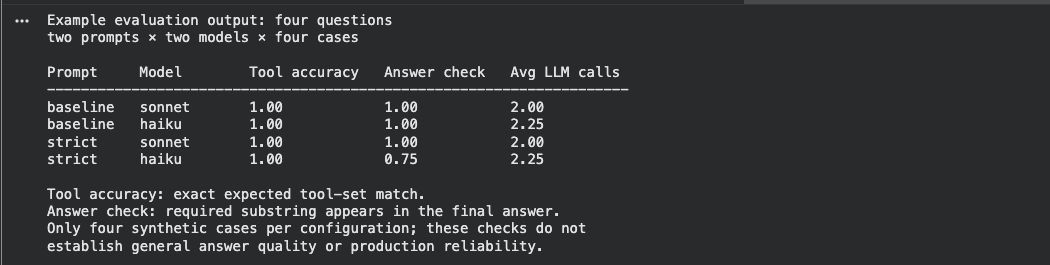
LangGraph Tutorial illustration

The four lines below the comparison loop show one result per prompt-model combination, each tested on the same four questions. tool_accuracy measures exact matches of the expected tool-name set; answer_accuracy measures expected-phrase matches; avg_llm_calls is the mean number of model calls per question. Here, strict haiku scores 0.75 on answer_accuracy: three of four phrase checks pass, compared with four of four for the other configurations. Inspect the individual answer before calling that a wrong answer, since a valid paraphrase can miss this check. These aggregate results do not check tool arguments, and four questions are too few to choose a production model.

That loop compares four configurations. Adding three tool-description variants and three retrieval settings expands the sweep to 36; at 50 questions and about three model calls per question, that's roughly 5,400 calls. Decide which questions and metrics matter before increasing the sweep, so the extra budget produces a useful comparison.

LangGraph Tutorial illustration

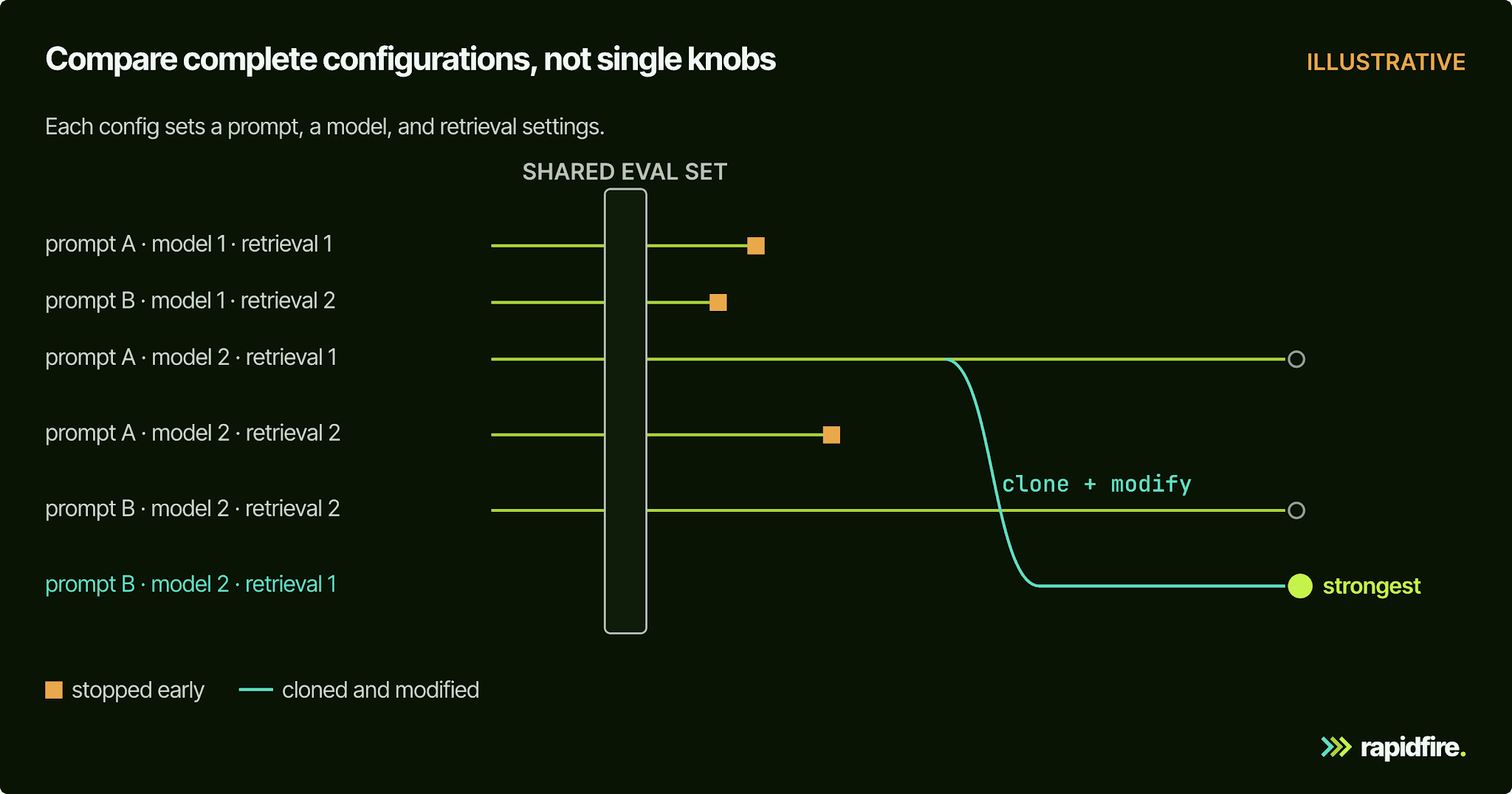
Retrieval changes can add indexing work: each change can mean re-indexing your docs and re-running the full eval. That's the comparison we built RapidFire for: an open-source (Apache-2.0) Python package that runs many retrieval and context engineering configurations against the same eval set at once. Chunking, embeddings, retriever and reranker settings, prompts, and the generator model are all knobs you can give a list of values. Your metrics are your own Python functions: the same kind of checks as evaluate above, written to score a batch of results.

While configs run, you can stop the weak ones and clone the strong ones with new retrieval, reranking, prompt, or generator settings, so the budget shifts toward what's working instead of finishing every run. If you only call model APIs, you don't need a GPU.

In a case study with a global automotive manufacturer, we evaluated 432 RAG configurations in about two days, and the winner beat both existing systems on 5 of 7 shared Ragas metrics. It also ranked first of all 432 runs on answer correctness but only about 282nd on faithfulness, a good reason to decide what you're optimizing before you sweep.

LangGraph runs your agent, and LangSmith traces it. Our open-source package doesn't run LangGraph graphs; it tunes the retrieval and context layer your agent's tools call, offline and before deployment. Comparing agentic workflow structures themselves is part of our broader platform, so if that's what you need, talk to us.

Common LangGraph Mistakes to Avoid

As you extend the agent, use this checklist to catch problems in its state, control flow, and evaluation:

  • Letting message state grow forever. With a checkpointer, every turn appends to messages until long threads overflow the context window, so trim, delete, or summarize older messages.

  • Trusting the default recursion limit. The limit caps super-steps per run and raises GraphRecursionError when reached; it isn't a model-call budget. Set an explicit limit for your workflow, for example graph.invoke(inputs, config={"recursion_limit": 10}), and check that legitimate tool loops finish within it. The LangGraph docs explain how the limit applies to graph execution.

  • Writing vague tool descriptions. "Looks up data" gives the model no basis for choosing, so say what the tool returns and when to use it.

  • Giving one agent too many tools. Past a certain point, tool calling gets unreliable, and the model picks the wrong one, which is the main signal to split into multiple agents.

  • Skipping the checkpointer in multi-turn or approval flows, so memory doesn't persist and interrupts can't resume.

  • Putting side effects before interrupt(), or wrapping it in try/except. The node re-runs on resume, and a broad except swallows the pause.

  • Mixing a normal edge and a conditional edge out of the same node. Both paths can run, and the graph gets hard to reason about.

  • Testing on five hand-picked questions. Build the eval set before you start tuning, not after.

Conclusion

You now have one support agent that can retrieve order details and policies, loop through tool calls, keep a conversation, and pause for approval. Use its evaluation function as the starting point for a test set drawn from your own support questions, then compare prompts and models against the same cases. That gives you a reason to choose a configuration before deploying it.

If your agent's tools retrieve from your own documents, the retrieval layer needs its own evaluation. The RapidFire RAG notebook on Colab runs four retrieval configurations side by side on a financial Q&A dataset in your browser, with no local install.

LangGraph Tutorial FAQ

Is LangGraph Free and Open Source?

Yes, under the MIT license. LangSmith, LangChain's platform for tracing, evaluation, and deployment, is a separate product.

Do I Need LangChain to Use LangGraph?

No. LangGraph can run without LangChain. This tutorial uses LangChain only for init_chat_model, the @tool decorator, and message types, which saves writing provider-specific client code.

Is LangGraph Good for Beginners?

It's approachable if you know Python, but it's deliberately low-level. If you're new to agents, start with LangChain's prebuilt agent loop: create_agent needs less code and runs on LangGraph underneath. Use LangGraph directly when you need custom routing, approvals, or multiple agents.

Does LangGraph Support TypeScript?

Yes. LangGraph.js is the JavaScript and TypeScript version, installed with npm install @langchain/langgraph @langchain/core.

How Do I Deploy a LangGraph Agent?

LangChain's managed option is LangSmith Cloud, with hybrid, standalone server, and self-hosted variants. You can also run the graph in your own service with a database-backed checkpointer such as PostgresSaver.