Self-Hosted LLM: When to Run Your Own Model and How to Decide
Written By:
Matt Tanner
Published on
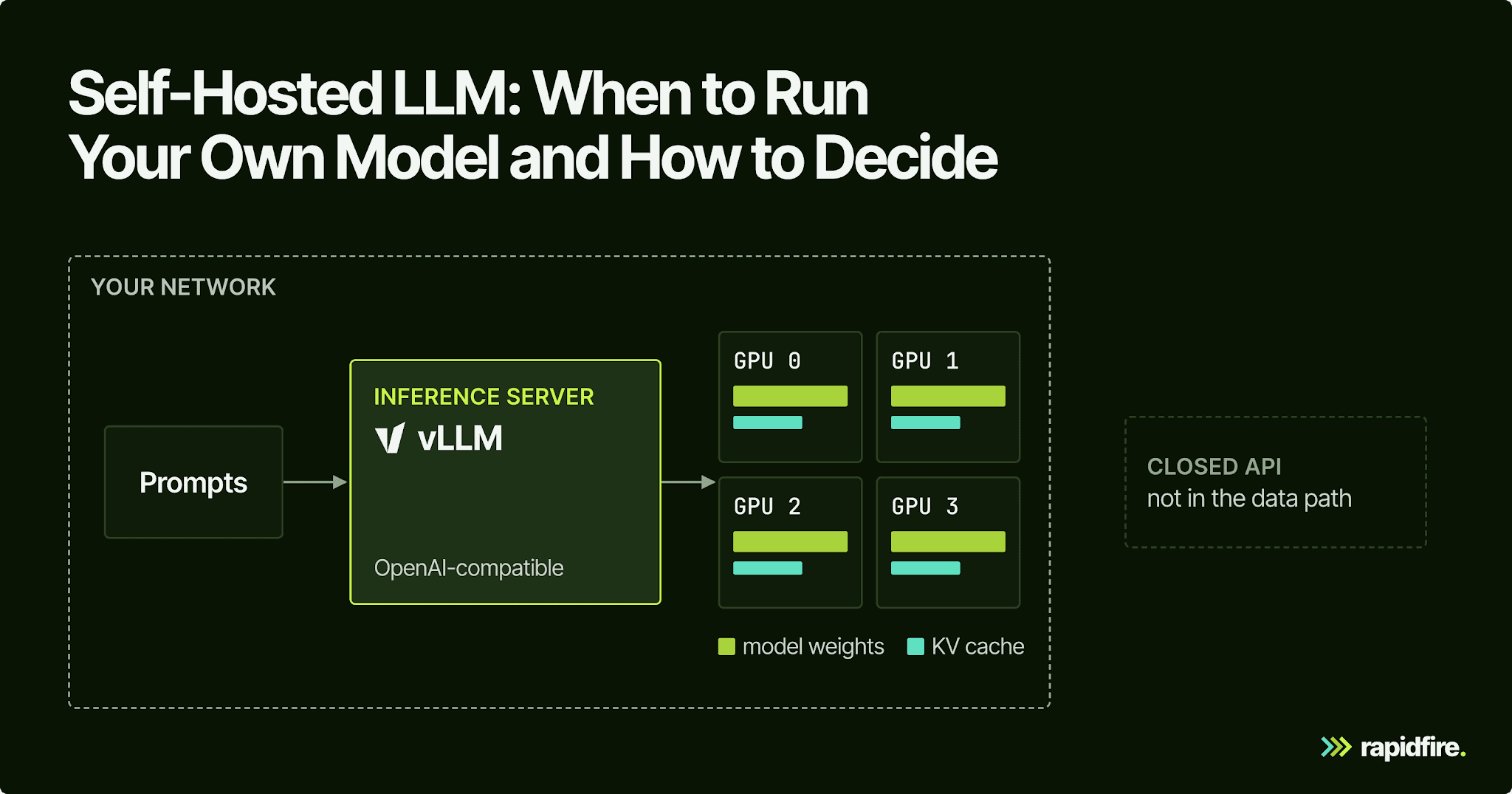
Every call your app makes to a closed model API sends the prompt outside your network, bills you per token, and runs on a model version someone else controls. During a prototype, that's a fair trade. Once the same call runs on every customer query, or the prompts carry patient records or your internal database schemas, the question changes: should you run a self-hosted LLM instead?
This guide covers hardware, serving stacks, and cost assumptions, then shows how to compare an open model against your current API on your own eval set before committing to GPUs.
What Is a Self-Hosted LLM?
A self-hosted LLM is a large language model whose weights run on infrastructure you control, such as on-prem servers, GPUs in your own cloud account, or a workstation. Your app calls it instead of a vendor's API. Prompts, outputs, and model versions stay under your control, and you take on serving, scaling, and upgrades.
The phrase covers two very different jobs. Running a 7B model on your laptop with Ollama or LM Studio is the narrow version of "host your own LLM". A local setup serves one user on one machine for prototyping. Production self-hosting is a shared service with an inference server on one or more GPUs, an OpenAI-compatible endpoint other apps call, auth, logs, and someone on call when it falls over. Same model weights, very different amount of work.
An open-weight model is one whose trained weights you can download, but "open" doesn't always mean open source. Some ship under Apache 2.0, others under custom licenses with commercial limits (more on that below).
Self-hosting also doesn't make a model smarter. It changes who holds the data and who picks the version, and an open-weight model is exactly as good at your task in your data center as anywhere else. Test whether the model meets your task's quality requirements before choosing where to host it.
Why Teams Self-Host LLMs
Evaluate self-hosting along three dimensions: data boundaries, cost at expected utilization, and control over the serving stack.
Data Control, Sovereignty, and Compliance
Check training and retention separately. OpenAI does not use API data to train its models unless you opt in. By default, abuse-monitoring logs can include prompts and responses and are kept for up to 30 days; zero-data-retention controls require OpenAI's approval.
For data privacy, then, training is the smaller concern. Copies of sensitive data still sit outside your boundary under someone else's retention policy and contract, including proprietary data you might not think of as sensitive. Text-to-SQL is a good example: every schema-linking request ships your table and column names to the provider, query after query.
For regulated data, this has legal weight. Under HHS guidance on HIPAA and cloud computing, a cloud provider that handles ePHI for a covered entity is a HIPAA business associate, and the two parties need a business associate agreement.
On fully self-hosted infrastructure, with embeddings, retrieval, tools, and logs inside your boundary too, prompts never leave your network, and you can draw the data path on a network diagram and prove it with your own access logs. That doesn't make you compliant by itself: you still need the risk analysis and safeguards your regulations require.
Cost at Scale
API pricing is metered: double the traffic, double the bill. A GPU costs the same per hour whether it's busy or idle, so the cost per query falls as you keep it busier. That's why self-hosting looks expensive for a pilot and cost-effective for a high-volume, well-defined task. The cost section below works through real numbers.
Control Over Versions, Latency, and Rate Limits
Model weights are files, which gives you full control over versions. You choose when to upgrade, run the new version next to the old one, and roll back if a workflow degrades. Hosted API models can be updated or retired on the provider's schedule instead.
You also stop working around someone else's rate limits, since a self-hosted server's ceiling is your hardware rather than a per-minute quota. Latency becomes yours too: no round trip to a vendor region, but your tail latency under load is now your problem.
When You Should Not Self-Host
Consider postponing self-hosting when:
Your volume is low or spiky, so a GPU would sit mostly idle while you pay for every hour.
Nobody on the team can own the operational complexity: GPU drivers, model upgrades, and an on-call rotation for the endpoint.
The task needs frontier-level reasoning out of the box and you haven't shown that an open model gets close.
You're still figuring out the product, and the ability to swap models with one config change matters more than unit cost.
Self-Hosted LLM vs. Closed API vs. Managed Private Deployment
It isn't a binary choice. A managed private deployment sits in the middle: a provider runs models on capacity dedicated to you, sometimes inside your own cloud account, and handles the operations.
Option | Data leaves your environment? | Upfront cost | Per-query cost | Ops burden | Quality ceiling | Best for |
|---|---|---|---|---|---|---|
Closed model (cloud API) | Yes, under the provider's retention terms | None | Metered per token | Lowest | Highest available frontier models | Prototypes, low or spiky volume, hard reasoning tasks |
Managed private deployment | Depends on where it runs; check the contract | Low to medium | Often capacity-based fees | Low to medium | Whatever models the provider supports, often open-weight | Regulated teams without an inference platform team |
Self-hosted LLM | No, if the whole path stays inside your network | GPUs or reserved cloud capacity | Amortized GPU cost; falls as utilization rises | Highest | Best open-weight model you can fit, plus your fine-tuning | High-volume, well-defined tasks and strict data rules |
A hybrid design can route sensitive or high-volume, narrow tasks to a self-hosted model and keep a cloud API for the hard, low-volume requests. For supported common endpoints and parameters, OpenAI compatibility on both sides makes that routing mostly a config change (base URL and model name) instead of a rewrite, which also keeps vendor lock-in low.
A common follow-up question is whether ChatGPT can be self-hosted. It can't: ChatGPT is OpenAI's hosted product. OpenAI's self-hostable option is gpt-oss, released in August 2025 under Apache 2.0 as gpt-oss-120b and gpt-oss-20b, which OpenAI calls its first open-weight language models since GPT-2.
What You Need to Run a Self-Hosted LLM
Self-hosting LLMs takes three things: enough GPU memory, an open-weight model whose license fits your use, and a serving stack that turns the weights into an endpoint.
Hardware: GPU Memory Is the Constraint
Start with GPU memory: the model's weights must fit alongside the memory it needs while answering requests. At 16-bit precision, each parameter uses about two bytes. A model with X billion parameters therefore needs roughly 2 × X GB of VRAM in bfloat16 or float16 for its weights alone.
Quantization stores weights at lower precision to reduce that requirement. Four bits per weight uses about a quarter of the storage of 16-bit weights, before the extra memory needed by the quantization method and the serving system.
Model size | bf16 weights (2 GB per billion params) | 4-bit weights (about a quarter, before overhead) |
|---|---|---|
1.5B model | ~3 GB | ~0.75 GB |
7B model | ~14 GB | ~3.5 GB |
70B model | ~140 GB | ~35 GB |
The table is a starting estimate, not a complete hardware specification. Hugging Face's worked example in the memory guide linked above used just over 9GB for a 4-bit model with slightly more than 15B parameters, rather than a strict quarter of its roughly 32GB bf16 footprint. Its 8-bit version used about 15GB.
Lower precision can also change the model's answers. Test the quantized version you intend to deploy rather than assuming that results from the full-precision model will carry over.
Leave room for the KV cache as well. This is saved attention state from tokens the model has already processed, which it reuses while generating the answer. Longer contexts and more simultaneous requests need more of this memory.
For example, Ollama documents that a 2K context with 4 parallel requests requires the memory of an 8K context. Size the deployment for the context lengths and concurrency you expect, not just the model's parameter count.
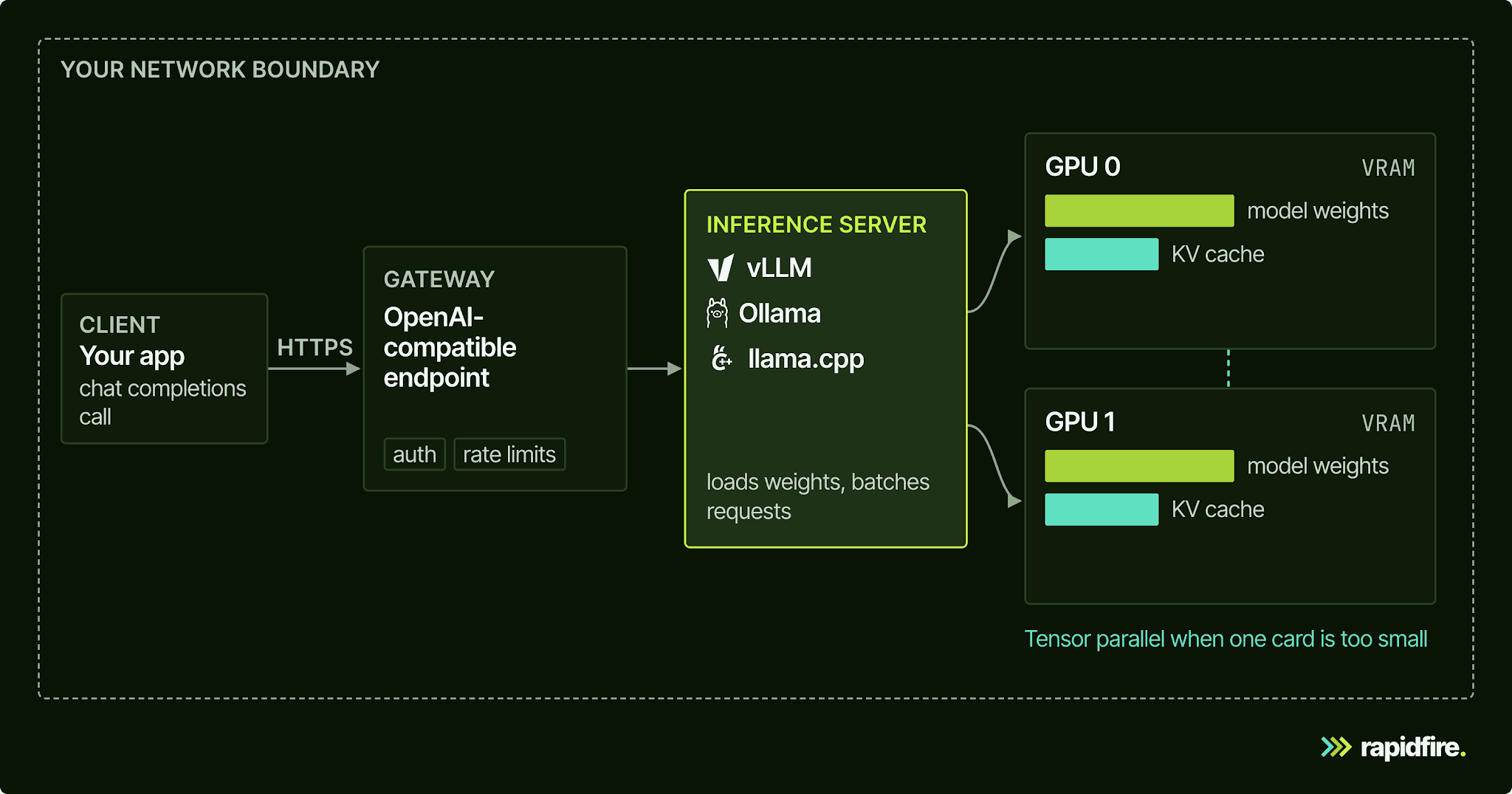
Start with one GPU if it can hold the weights and the runtime memory your workload needs. In vLLM, you can use tensor parallelism to split a model across GPUs when one device is not enough.
For scale, a 70B model in bf16 needs about 140 GB just for weights, already beyond an 80GB card. A 4-bit 7B model has a much smaller weight footprint and may fit on a consumer GPU, but you still need room for its cache and serving overhead.
Picking an Open-Weight Model
Common starting points include the Llama, Qwen, Mistral, DeepSeek, and gpt-oss families, each in several sizes.
Choosing the right model starts with task fit, then size. A narrow task like classification, extraction, or schema linking often doesn't need a 70B model, while open-ended reasoning may need larger models. Our post on SLM vs. LLM covers that trade-off in depth. The short version: shortlist two or three sizes and let your eval set decide.
Check the license for the exact checkpoint, not the family. Qwen2.5-0.5B-Instruct, Qwen2.5-7B-Instruct, and Mistral 7B Instruct v0.3 are Apache-2.0. Qwen2.5-3B-Instruct, sitting right between them, ships under the Qwen Research License, which grants rights for non-commercial purposes only. The Llama 3.1 license adds commercial terms for very large services: if your or your affiliates' products or services had more than 700 million monthly active users in the calendar month before Llama 3.1's release date, you must request a separate license from Meta. Read the LICENSE file before a model makes your shortlist, not after it wins.
Serving Stack: Ollama and LM Studio Locally, vLLM in Production
The serving layer loads the model onto the GPU and exposes an API. Ollama, LM Studio, llama.cpp, and vLLM all expose OpenAI-compatible endpoints, so an app that sticks to common calls like chat completions usually changes a base URL and model name instead of its code. Support varies by server, so check the endpoints and parameters you rely on before you switch backends.
Tools like Ollama and LM Studio can run a local LLM. They're built for local inference on a developer machine: Ollama handles one request per model at a time unless you raise
OLLAMA_NUM_PARALLEL, which defaults to 1.llama.cpp targets a wide range of hardware, from Apple silicon to CPU+GPU hybrid setups for models bigger than your VRAM, with integer quantization from 1.5 to 8 bits and its own OpenAI-compatible server.
vLLM is built for serving multiple users at once. It manages KV-cache memory with PagedAttention, batches incoming requests continuously, and splits large models across GPUs. Its OpenAI-compatible server accepts calls from apps using the supported API endpoints, and there's an official
vllm/vllm-openaiDocker image.Hugging Face TGI still shows up in older guides, but it is now in maintenance mode. For new deployments, Hugging Face recommends vLLM, SGLang, llama.cpp, or MLX.
In a typical production layout, your app calls an OpenAI-compatible endpoint, and a gateway handles auth and rate limits. Behind it, an inference server runs the model on GPUs inside your network.
How Much Does It Cost to Self-Host an LLM?
Compare the costs over the same workload and time period. An API bill depends on the input and output tokens you send at the applicable prices. With self-hosting, you pay for hardware capacity and operations, then spread that cost across the requests served.
Utilization changes that calculation. If hourly cost and throughput while busy stay the same, a GPU busy 60% of the time serves twice as many queries as one busy 30% of the time. Its GPU cost per query is therefore half as much. That saving depends on having enough useful traffic to keep it busy.
That's why there's no universal breakeven token count. What matters is whether your traffic keeps the hardware busy.
In our July 2026 schema-linking comparison, several closed APIs and fine-tuned open models answered the same held-out questions with the same schemas, prompts, and grader. That gives the cost and quality figures a common task-specific basis: quality runs from 0 to 1, and cost is per million queries.
Model (case study, Jul 2026) | How it runs | Quality score | Cost per million queries |
|---|---|---|---|
GPT-5.5 | Closed API | 0.917 | $24,350 |
GPT-5.4-mini | Closed API | 0.765 | $2,075 |
Gemini 2.5 Flash | Closed API | 0.840 | $876 |
Second fine-tuned open model (checkpoint unconfirmed) | Self-hosted, 60% GPU utilization | 0.738 | $736 |
Fine-tuned 1.5B open model | Self-hosted, 60% GPU utilization | 0.705 | $419.56 |
The fine-tuned 1.5B is about 58× cheaper than GPT-5.5, but that's not a fair comparison. Against Gemini 2.5 Flash, it's 2.1× cheaper and 0.135 less accurate. Frontier APIs still had the best out-of-the-box quality.
The self-hosted numbers are amortized GPU cost at 60% utilization. Lower utilization raises the cost per query, and at low volume a small model can cost more to serve than an API. Run the same math with your own traffic before you trust anyone's cost savings figure, including third-party breakeven rules of thumb.
Two costs don't show up in a per-query number. The whole fine-tuning sweep used about $7.52 of compute, but making this approach work also takes expertise. Count the people who will handle upgrades, security reviews, and on-call duties. Then count the eval work that tells you whether the cheaper model is good enough. Without methodical experimentation, a self-hosted RAG and context engineering pipeline can consume extra GPU time on poorly chosen configurations.
How to Decide: Test an Open Model Against Your API Before You Switch
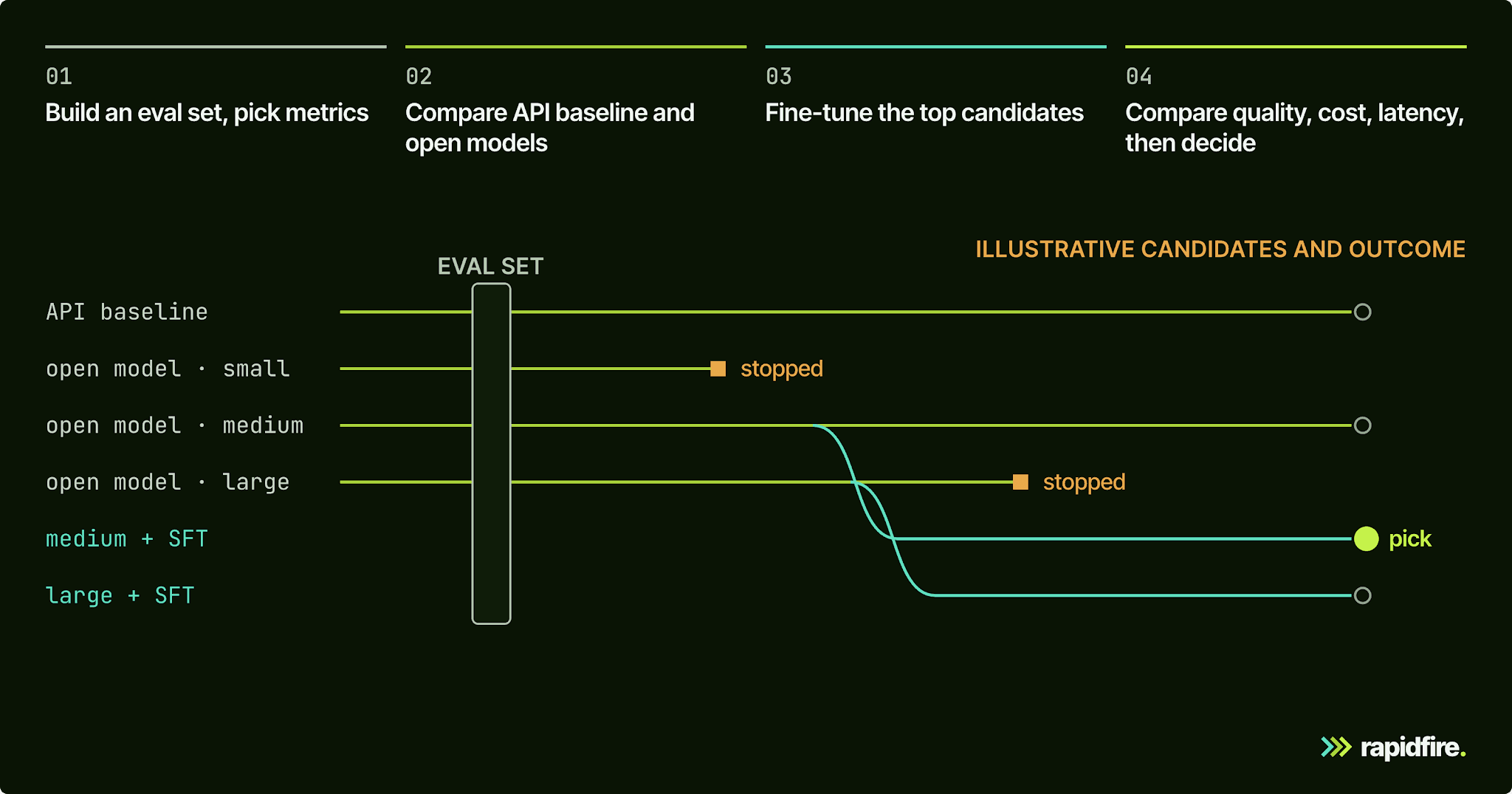
Search for the best self-hosted LLM, and you'll find leaderboards ranking open models on public benchmarks. They're useful for a shortlist, but they can't tell you whether a model handles your specific use case, with your prompts, formats, and edge cases. A more reliable self-hosted LLM eval is a bake-off on your own eval set. Put your current API next to a few open models, with the same prompts and the same grader, before and after light fine-tuning.
Build a Small, Representative Eval Set and Pick Metrics First
Pull real inputs from your logs, label the expected outputs, and split them. The schema-linking case study from the cost comparison above used 301 examples for training, 101 for validation, and 101 held out for scoring, and picked the winning config on validation, never on the test set. A few hundred labeled examples is a realistic start for a narrow task.
Pick metrics before you look at any results. Start with a task-level quality score; the case study combined table- and column-level precision, recall, and F1. Then add what breaks in production: format validity, instruction following, latency, and cost per query.
Format validity can sink an open model that looks fine on content. In the case study, the untuned 1.5B returned invalid JSON on 59.4% of questions. For a deeper look at choosing scores, see our guide to LLM evaluation metrics.
Compare Several Open Models and Sizes Side by Side, Not One at a Time
Testing one model, then the next, then the next is slow, and conditions drift between runs. You tweak a prompt, change a parser, or re-label an example halfway through. Running candidates side by side keeps the comparison honest.
We built RapidFire, an open-source experiment engine, for this step. Its generator configs cover both sides of the decision: closed-model APIs through RFAPIModelConfig and self-hosted open models through RFvLLMModelConfig, a wrapper around vLLM. That lets you compare closed APIs and self-hosted open models on the same eval set, prompts, and metrics.
In the sketch below, the open-model candidates form one config group, the API baseline forms another, and both share the same functions.
This is a configuration sketch, not a standalone script. Before using it:
First, set up Python 3.12+ and install and start RapidFire using the quickstart for your installed version.
Provide a Hugging Face eval
Datasetand the foursample_*functions.Load
OPENAI_API_KEYsecurely in your own environment.Preprocessing must return prompts; postprocessing must supply the fields your scorer expects.
The open models require enough GPU memory for the selected checkpoints.
Creating
RFAPIModelConfigprovisions the MLflow gateway endpoint and secret, so even constructing it requires the running gateway and valid credentials.Replace the rate-limit placeholders below with your account's actual model quotas.
The two calls return per-run configuration/metric dictionaries for comparing quality; they do not print a winner:
The two calls use the same eval dataset, prompts, and metric functions. They also set a numeric generation limit of 512 tokens on each side, but the limits do not mean exactly the same thing. The API allowance includes hidden reasoning tokens, which are billed as output, so it may leave less room for the visible answer.
Match generation settings where the models support them, report any differences you cannot match, and check for truncated responses. Shared prompts and graders give you a common basis for comparison; they do not remove those model-specific differences.
As shards complete, you get running estimates with confidence intervals for metrics declared with an algebraic or distributive type and value range. If your eval set is sorted or grouped, shuffle it first so those early estimates aren't biased.
You can stop weak configs early, then clone the strong ones and modify them mid-run, for example by swapping in a larger model or a different prompt. That lets you redirect the remaining budget toward stronger candidates.
For a retrieval-based application, compare the model together with the context it receives. Our FiQA tutorial demonstrates this with two self-hosted generators, Qwen2.5-0.5B-Instruct and Qwen2.5-3B-Instruct, two chunk sizes, and two reranker settings. That produces eight configurations, showing how retrieval choices interact with model choice.
If you self-host embeddings too, our guide to the best embedding models for RAG covers that decision. Check licenses before reusing the tutorial commercially: its 3B checkpoint is research-licensed. A commercial shortlist should use a suitably licensed alternative, such as an Apache-2.0 checkpoint.
Close the Gap With Fine-Tuning (SFT/LoRA) and Re-Measure
Fine-tuning can help when a small model struggles with the task's format or domain. In the schema-linking case study, the untuned 1.5B model scored 0.351 on schema linking, below the 0.367 baseline that simply returned every table and column. It also produced valid JSON on only 40.6% of questions.
Supervised fine-tuning (SFT) trains the model on example inputs and desired outputs. Using a LoRA adapter, a small set of trainable parameters rather than updating all the model's weights, we trained on 301 examples. The resulting model scored 0.705, and strict JSON validity reached 100% on the measured set.
The experiment compared 16 fine-tuning configurations: combinations of base model, how the schema was represented, and LoRA rank, which controls the adapter's capacity. We trained them concurrently on two A100 GPUs. The sweep used 2.97 GPU-hours and took 3 hours 29 minutes of elapsed time.
RapidFire supports SFT as well as DPO and GRPO, other post-training methods. Whatever method you use, re-score the resulting candidates on the held-out set with the same grader as the API baseline. Training progress alone does not establish that the model is ready to replace it.
Whether a task needs fine-tuning at all, or better retrieval instead, is its own decision. We cover it in RAG vs. fine-tuning.
Decide on the Quality, Cost, and Latency Tradeoff, Not on a Leaderboard
Set the decision criteria before reviewing the results: a minimum quality score, a maximum cost per million queries, and an acceptable p95 latency, the time within which 95% of requests should finish. First discard candidates that fail those requirements. Then compare the remaining quality and cost tradeoffs.
The schema-linking case study makes that tradeoff concrete. Moving from Gemini 2.5 Flash to GPT-5.5 increased the quality score by 0.077 and cost about 28 times as much. Whether that improvement is worth paying for depends on what an error costs your business.
Lead with feasibility, then cost. The first question is whether any self-hosted candidate clears your quality bar and deployment constraints at all, and only then does the cost gap decide things.
The schema-linking comparison was a small initial experiment with one training run per configuration. Repeat close comparisons before committing to hardware.
Running a Self-Hosted LLM in Production
Once a candidate clears the evaluation, assign the deployment and operations work:
Lock down access. At minimum, require a key on the inference server; vLLM checks API keys when you pass
--api-keyor setVLLM_API_KEY. Better, put a gateway in front that ties requests to your identity provider, applies per-team rate limits, and logs every call, because those logs are your compliance evidence.Monitor what users feel: p50 and p95 latency, error rates, queue depth, and GPU memory. Servers queue requests when they're busy (Ollama, for one, queues up to 512 by default before rejecting), so capacity problems often show up as latency spikes before they show up as errors.
Plan for scale. Add replicas behind the endpoint for more users, and use tensor parallelism when a bigger model no longer fits on one GPU. Choose an orchestration setup that matches the capacity and operational requirements.
Treat model updates as releases. New weights or a new quantization should pass the same eval set from the decision step before they take traffic, and the previous version should stay deployable so a rollback takes minutes.
Name an owner for the endpoint, the on-call rotation, and the upgrade cadence. If nobody fits, revisit the "when not to self-host" list.
Conclusion
Self-hosting an LLM is a business decision you can measure. Data rules or steady volume make the case for it. A side-by-side eval of open models against your current API, on your own data, tells you whether the case holds, and it's far cheaper to run that eval before buying GPUs than after.
To try the comparison workflow, open our RAG notebook on Colab. It runs a FiQA RAG pipeline with a self-hosted Qwen2.5-0.5B model through vLLM and compares chunking and reranking configs on one eval set, with no local install. When you're ready to run your own candidates, pip install rapidfireai, run rapidfireai init and rapidfireai start, then swap in your eval set and models. If you're weighing a move off closed APIs for a production workload, you can talk to our team.
FAQ
Is self-hosting an LLM worth it?
Self-hosted LLMs are worth it when data control or volume justifies the operational work, and when an open model clears your quality bar on your own eval set. For low or spiky traffic, a closed API is usually cheaper and simpler. For a high-volume, narrow task with sensitive data, a fine-tuned open model can land close to a comparable API model at a fraction of the serving cost.
How much does it cost to self-host an LLM?
It depends on GPU cost and utilization. In our July 2026 schema-linking case study, the fine-tuned 1.5B model cost $419.56 per million queries at 60% GPU utilization, against $876 for Gemini 2.5 Flash, which scored 0.135 higher. At lower utilization, self-hosted cost per query rises, and an API can come out cheaper.
What is the best self-hosted LLM model?
There's no single best model. Leaderboards rank models on public benchmarks, but the right pick depends on your task, hardware, and license needs. Shortlist two or three open-weight models in different sizes from families like Qwen, Llama, Mistral, DeepSeek, or gpt-oss. Check each checkpoint's license, then score them against your current API on the same eval set and metrics.
Can ChatGPT be self-hosted?
No. ChatGPT is a hosted OpenAI service, and OpenAI doesn't distribute the models behind it as weights. OpenAI does publish two open-weight gpt-oss models under Apache 2.0, gpt-oss-120b and gpt-oss-20b, that you can download and serve on your own GPUs. Other open-weight families, such as Qwen, Llama, and Mistral, are self-hostable too.