What Is Context Engineering? A Practical Guide for AI Teams
Written By:
Matt Tanner
Published on

Context failures can look like model failures: an assistant quotes last year's refund policy, misses an instruction buried under retrieved chunks, or picks a tool that does not fit the task. Check the information supplied to the model as well as the model itself.
Context engineering is the work of deciding what the model sees on each call. This guide explains how it differs from prompt engineering, what fills a context window, and how to select, manage, and test that context.
What Is Context Engineering?
Context engineering is the practice of deciding what goes into a large language model's context window, and in what form, so the model can do the task. That includes instructions, examples, retrieved data, memory, tool results, and output format, assembled fresh for each call so the model gets the right information at the right time.
Take a travel-insurance support bot answering "Can I cancel after my trip has started?" The model needs a system prompt that sets its role and limits, plus the two or three policy sections that cover mid-trip cancellation. It also needs the customer's plan type from an account lookup, the last few turns of the chat, and a response schema the app can render. Prompt wording is one line item in that list, and most of the rest changes from one request to the next.
The term caught on in June 2025. Shopify CEO Tobi Lutke said he preferred it to "prompt engineering" because it describes "the art of providing all the context for the task to be plausibly solvable by the LLM." Six days later, Andrej Karpathy added his "+1," describing it as filling the context window "with just the right information for the next step." LangChain had written about "the rise of context engineering" two days earlier; Anthropic followed in September.
Context assembly decides which evidence reaches the model and how it is arranged. A document store can exceed the context window, and filling the available space can reduce the model's ability to use relevant information, as the long-context benchmarks below illustrate.
Context Engineering vs. Prompt Engineering
Prompt engineering is about writing and organizing the instructions. Context engineering extends that work to selecting and maintaining everything the model sees during inference: instructions plus the evidence, history, tools, and other information assembled around them. Prompt engineering is a subset of context engineering, not a rival to it.
Aspect | Prompt engineering | Context engineering |
|---|---|---|
Scope | The instruction text and its wording | Everything in the window, instructions included |
When it happens | Mostly at design time | At runtime, on every call, by code that assembles context |
Inputs it controls | Role, task, constraints, phrasing | Documents, examples, history, memory, tools, ordering, format |
Who owns it | Whoever writes the prompt | Engineers who build retrieval, memory, and tool plumbing |
How you test it | Prompt variants scored on a labeled eval set | Combinations of context settings scored on a labeled eval set |
Typical failure | Ambiguous or contradictory instructions | Right instructions, wrong evidence: missing, stale, buried, or conflicting |
The prompt engineering vs context engineering split matters most in multi-turn apps and AI agents, where the instructions stay put, and everything around them keeps changing. For tuning the instruction text itself, see prompt optimization.
Why Context Engineering Matters
Context length, token cost, and multi-step execution create three constraints:
A larger context window gives you room for more information, but does not guarantee the model will use it well. Anthropic reports that recall can degrade as context grows, with the rate varying by model.
The NoLiMa benchmark makes the risk concrete. It tested retrieval when the question and relevant passage shared few literal words. At 32K tokens, 11 of 13 models scored below half their short-context baseline, despite supporting at least 128K tokens. GPT-4o fell from 99.3% to 69.7%. These results describe that benchmark, but they show why a context-size limit is not a quality guarantee.
Placement matters too. Lost in the Middle found that models often performed better when relevant information appeared near the start or end of the input than when it sat in the middle.
Input tokens affect cost and latency differently. Input tokens are billed on every call, so extra retrieved chunks add input-token charges across requests. Latency is less sensitive: trimming input tokens usually saves relatively little latency unless you're working with truly massive contexts. Treat input trimming mainly as a cost and quality lever.
An agent can gather much more context than an ordinary chat exchange. Each tool call adds information that may be carried into the next model call. Ten search results of roughly 2,000 tokens each add about 20,000 tokens of tool output alone.
Some of that material will still matter; some will be redundant or stale. Deciding what to keep, summarize, or drop between steps is context management. The agent harness around the model handles that ongoing work.
The Components of Context
The context window has a finite token budget. Instructions, examples, retrieved data, memory, tool definitions and results, and output constraints share that budget with the user's request.

Instructions and System Prompt
The system prompt carries the system instructions: the role, the task, the rules, and what to do when relevant information is missing. Give the model concrete guidance without hardcoding a brittle decision tree; separate the sections with XML tags or Markdown headers so their roles are clear.
Examples (Few-Shot)
Examples show what good output looks like. Pick a small, varied set that demonstrates the expected behavior, rather than spending the window on every edge case. Which examples you use, how many you include, and how you pick them per query all affect results, as the few-shot prompting guide shows.
Retrieved Knowledge (RAG)
Retrieval-augmented generation brings relevant passages from a knowledge base into the prompt when a query arrives. The selected text depends on how you split documents, which embedding model you use, how many chunks you retrieve, and whether a reranker selects a smaller set. Our RAG pipeline guide explains those stages.
An agent can also load information as needed. Instead of carrying every document through every step, it can keep a file path or stored query and use a tool to fetch the relevant content later.
Memory (Short-Term and Long-Term)
Short-term memory is the conversation so far: thread-scoped message history within a session. Long-term memory stores user-specific or application-level facts across sessions, such as a user's plan type or preferred language. Short-term memory grows each turn until it must be trimmed or summarized. Long-term memory has the opposite problem: it only helps if the right memory gets pulled back into the window at the right time.
Tools, Tool Results and MCP
Tool definitions consume context: each name, description, and parameter schema adds tokens and another action to consider. Anthropic reports seeing tool collections whose overlapping functions leave agents unsure which tool to use. Make each tool's purpose and inputs distinct enough that an engineer can explain when it applies.
Tool outputs then land back in the window, often as raw JSON. The Model Context Protocol (MCP) standardizes how LLM applications connect to external data sources and tools, with servers exposing prompts, resources, and tools over JSON-RPC 2.0. MCP makes connecting tools easier, which makes it easier to connect too many (eating up available context).
Output Format and Structure
A JSON schema, a required citation format, or a "say you don't know" rule is context too, and it constrains the answer. Structured output features go further: OpenAI's Structured Outputs, for example, ensure responses adhere to a supplied JSON Schema. That moves format enforcement out of the prompt and into the API.
Core Context Engineering Techniques
The techniques below cover selection, compression, ordering, isolation, and persistence.
Select: Retrieve Only What the Task Needs
Selection determines the evidence available to the rest of the pipeline. For context retrieval, filter by metadata before semantic search, so a question about a gold-tier plan never sees bronze-tier clauses. Hybrid search (keyword plus vector) helps when queries contain exact codes or names. Tune how many chunks you retrieve instead of defaulting to a big number "to be safe." Chunk boundaries matter too, since a clause split across two chunks can't be retrieved whole. Semantic chunking keeps related text together.
The same logic applies to examples, tools, and memory: select the few that fit this request, not all of them.
Compress: Summarize and Trim History
Compaction replaces a conversation nearing the context limit with a summary in a fresh window. Clearing old tool results is a relatively gentle way to reduce that history: drop the raw 3,000-token search result from ten steps ago, or keep a one-line note of what was learned. Summaries lose detail, so check that the facts your task depends on survive.
Order and Format: Put the Most Relevant Evidence Where the Model Uses It
Given the Lost in the Middle findings, put the strongest evidence at the start or end rather than in the middle. For long inputs (20K+ tokens), Anthropic's long context prompting tips recommend placing the documents near the top of the prompt and the query at the end.
Ordering also affects prompt caching. A cache can reuse a shared prompt prefix (the unchanged tokens at the beginning), so stable instructions and examples can benefit from appearing first. Balance that reuse with the placement of query-specific evidence.
Test the layout on your own workload. A reranker can put the most relevant chunk first, as our guide to reranking in RAG explains. Tags containing each document's source and date can also make citations and debugging easier.
Ordering and formatting can be tested without changing the generator. In RapidFire AI, for example, the prompt-assembly function and per-chunk document template are set per config, so two orderings can run side by side.
Isolate: Split Work Across Sub-Agents or Tools
Use a separate context when a task can be handled independently. A focused sub-agent can inspect its own evidence and return a summary, leaving the lead agent's window free of the intermediate material. A tool can do something similar by querying a table and returning three relevant rows rather than the whole dataset.
This reduces clutter in the main window, but introduces more calls and can lose details in the summary. Our agentic RAG guide explains how this approach applies to multi-step retrieval.
Write and Persist: Memory Outside the Window
With structured note-taking, an agent writes notes to storage outside the context window and pulls them back in later, like a to-do list or a NOTES.md file. Long-term memory stores do the same across sessions. The engineering work is in the read path: deciding which notes or memories are relevant enough to reload on this turn.
Common Context Failures (and How to Spot Them)
Drew Breunig's taxonomy distinguishes context poisoning, distraction, confusion, and clash. The examples below explain those four failures alongside two retrieval failures.
Context poisoning lets an error become evidence for later steps. In the Gemini 2.5 Pokémon-agent example, incorrect game-state information entered the agent's goals and summary, reinforcing goals it could not complete. Validate facts before persisting them in summaries or memory.
Context distraction can occur when the growing history dominates planning. In the same Gemini 2.5 experiment, the researchers anecdotally observed that well beyond 100K tokens, the agent repeated past actions instead of forming new plans. Compaction or summarization reduces that accumulated history.
Context confusion comes from irrelevant context, especially too many tools. In the Less is More study, a quantized Llama 3.1 8B picked the wrong tool for a benchmark query when given 46 tools and the right one when given 19. Select tools per request instead of loading them all.
Context clash is when parts of the context disagree, often because information arrived across several turns. Microsoft and Salesforce researchers measured the effect in LLMs Get Lost in Multi-Turn Conversation: top LLMs scored an average of 39% lower when a task was split across turns than when it arrived in one prompt. Early wrong assumptions tend to stick. Consolidating requirements into one updated block helps.
Lost in the middle looks like the model ignoring a fact that's clearly in the context, often because the passage sits mid-window. Rerank so the best evidence lands first, and retrieve fewer chunks.
Irrelevant chunks show up as confident answers built on the wrong section, like a bronze-tier clause applied to a gold-tier customer. Check chunking and retrieval precision before you touch the prompt.
How to Tell If Your Context Is Working: Treat It as an Experiment
Every component and technique above comes down to settings someone picked, and those settings interact. Chunk size changes what the embedder sees, retrieval depth changes what the reranker gets, and the reranker changes what the model reads. Compare combinations on the same eval set rather than selecting them from a few outputs.
Our RapidFire AI case study compares retrieval configurations on a fixed benchmark. The customer, a global leader in enterprise data and analytics, had built an illustrative customer-facing chatbot over a travel-insurance policy. We pinned the generator (gpt-3.5-turbo) and the embedder, built 76 question-and-answer pairs from the policy, and swept 40 retrieval configurations.
The winner split the policy into 512-token chunks, retrieved the top 10 by similarity, and reranked down to the best 2. That lifted the retrieval composite from 0.439 to 0.627, about 43% on that benchmark, with the model and embedder unchanged. We treat it as a controlled demonstration on a synthesized benchmark, not a production measurement, and a different corpus would need its own sweep.
Build a Small, Labeled Eval Set
You don't need thousands of examples to start. The case study above used 76 synthesized pairs, and its second case used a 28-question set hand-curated by the customer's own team. Pull real questions from logs or tickets, record the expected answer or source passage for each, and include awkward cases like questions your data can't answer. Hold back a slice you never tune on, and use it to confirm the winner before you ship.
Choose metrics that reveal different failures. Retrieval precision and recall tell you whether useful evidence arrived. Faithfulness checks whether the answer stays supported by that evidence; answer correctness compares it with an expected answer. Track latency and cost per query alongside them. Our guide to LLM evaluation metrics covers the options.
One score can hide a tradeoff. In the second case study's 432-configuration sweep, the overall winner ranked first on answer correctness but only about 282nd on faithfulness. The result depends on what the selection criteria reward.
Turn Context Choices Into Knobs
List the context decisions you're unsure about and give each a few candidate values. Start with data preprocessing and retrieval, since that's where your own data shapes the answer, then move on to models and prompts. Which knobs matter most still depends on your corpus, task, and metrics.
Layer | Knob | Example values to compare |
|---|---|---|
Data preprocessing | Chunk size and overlap | 256, 512, 1,024 tokens; 0 or 64 overlap |
Retrieval | Embedding model | Two candidate embedders |
Retrieval | Search type and k | Similarity vs. MMR; k of 5, 10, 20 |
Retrieval | Reranker and | None vs. a cross-encoder; keep 2 or 5 |
Prompt | Instructions and template | Current template vs. one with explicit citation rules |
Prompt | Few-shot examples | 0, 3, or 5 examples; similarity-picked vs. fixed |
Model | Generator | A small, cheap model vs. a larger one |
Multiply those options out, and even this short table produces thousands of combinations, so you'll want a way to prune.
Compare Configurations Side by Side, Then Prune
The loop has five steps:
Choose knobs and a few values for each.
Run many configs on an eval set, scored the same way.
Compare metrics, looking at trade-offs, not one number.
Prune and clone: drop clear losers and spin off variations of the strong configs.
Ship the winner, and rerun the loop when your data or model changes.
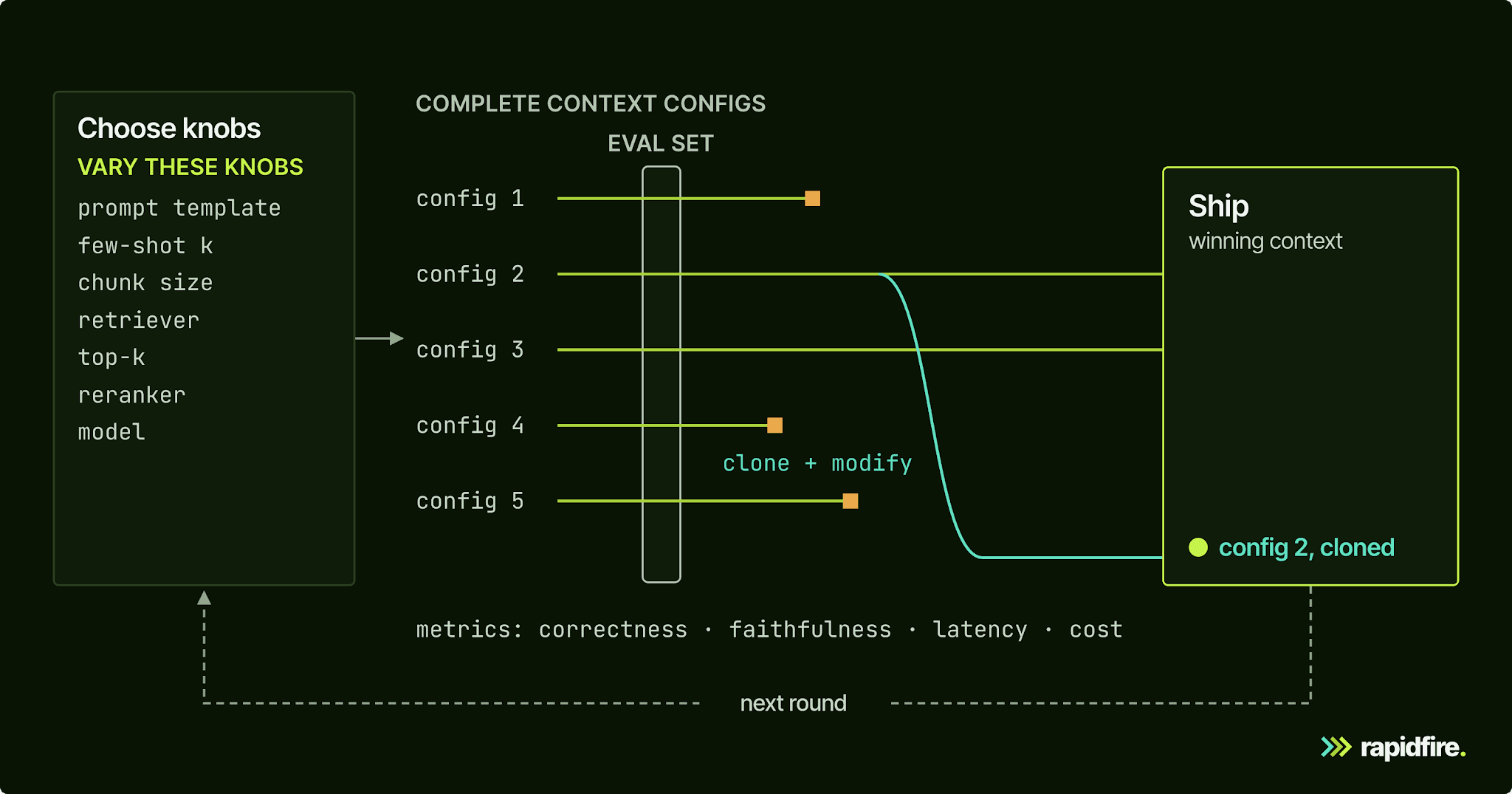
RapidFire AI, our open-source Python package for experimenting across RAG and the wider context engineering stack, is built for this loop. Its RAG spec wraps LangChain and covers loading, chunking, embedding, indexing, retrieval, and reranking. Its prompt manager handles instructions and semantic similarity-based few-shot example selection, and most of those knobs can take a list or range of values to generate a group of configs.
RapidFire runs configurations in parallel on the same eval set, scored by Python metric functions you provide. Those functions can include your own LLM-as-a-judge calls.
For RAG evaluations, metrics with a supported aggregation type and value range receive running estimates and confidence intervals as results arrive. Shuffle a sorted or grouped eval set first to reduce the risk of misleading early estimates. You can then stop weak configurations and clone promising ones with different search, reranking, prompt, or model settings.
These are offline experiments to choose settings before deployment. For RAG and context-engineering experiments that use only closed model APIs, no GPU is required.
You still choose the options and evaluation criteria; RapidFire AI runs and scores the configurations.
Conclusion
Context engineering is deciding which instructions, examples, documents, memories, and tool results make it into a finite window, in what order and format. Bigger windows still need selection, while agent runs add history and tool results across steps. Treat each context choice as a parameter and compare combinations on your own eval set.
For a small example of that loop, our GSM8K context engineering tutorial compares few-shot settings and models across six configs. For retrieval, you can get started on Colab in a couple of minutes with no local setup, or pip install rapidfireai.
If you're working through retrieval and context engineering on a larger system, you can also talk to our team.
FAQ
What Is Context Engineering in Simple Terms?
It's deciding what information an AI model sees before it answers. That covers the instructions, a few examples, the documents retrieved for the question, relevant history and memory, the tools it can call, and the answer format. Good context engineering gives the model the right information at the right time, and no more than it needs.
Is Context Engineering Replacing Prompt Engineering?
No. Prompt engineering is part of context engineering, so the context engineering vs prompt engineering question isn't either-or. Writing clear instructions still matters, but in apps that retrieve data, keep memory, or call tools, the instructions are a small share of what the model reads. Context engineering covers the rest: what gets retrieved, remembered, summarized, and dropped on every call.
How Do You Learn Context Engineering?
Build something small and measure it. Take a RAG app or agent you already have, write 30 to 100 labeled test questions, and compare a few context settings side by side while tracking quality and cost. Read the context and prompting guides from model providers like Anthropic and OpenAI, plus long-context research like Lost in the Middle.
What Tools Are Used for Context Engineering?
A context-engineering stack can include a search index or vector database, a reranker, an orchestration framework, tool servers, and a memory store. Add an evaluation setup that compares context configurations on the same labeled inputs.